Embedding raw headers in HTTP communications

· 2 min read

New feature added on request by Flowbird integration team:

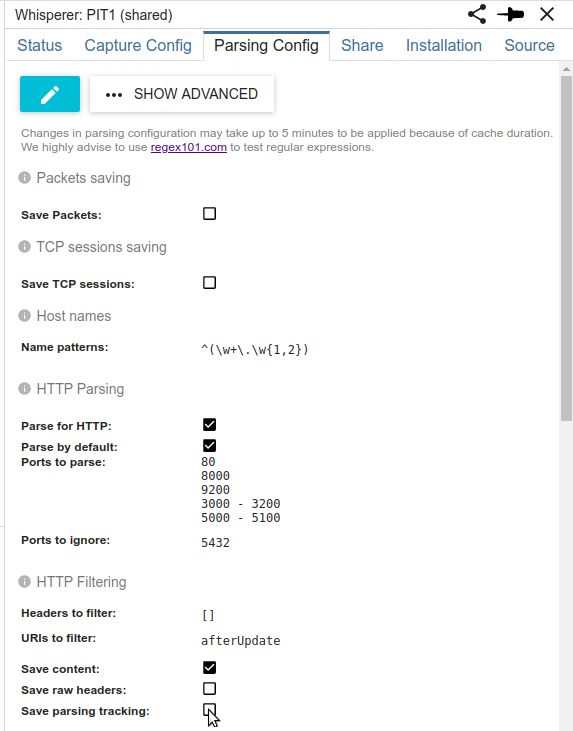
It is now possible to save raw headers inside the HTTP communication resource.

  • This is interesting when the packets are not saved.
  • Filtering on headers is not applied on raw headers
  • Raw headers are filtered out (like content) when searching HttpCom resources by default, but they can be included with "withContent": true parameter in search body
  • Raw headers are automatically included when exporting communications

Effect

The view source link in Headers tab is then working even if packets have not been saved.

Configuration

On the Parsing Config tab of Whisperer settings.

You may also specify URIs for which you want NOT to save rawHeaders (in case of privacy concerns for instance)

Resource change example

In req and res field:

"rawHeaders": {
"content": "GET /v1/posEventStatuses?modulo=1&remainder=0&view=content&afterUpdateMarker%5B%5D=85597012&afterUpdateMarker%5B%5D=38696&range=100 HTTP/1.1\\r\\nAuthorization: JWT eyJhbGci...\\r\\nHost: itproduction\_gateway\\r\\nX-Forwarded-Host: itproduction\_gateway\\r\\nX-Forwarded-For: 10.0.0.129\\r\\nX-Forwarded-BasePath: /terminal/devicemonitoring\\r\\nConnection: close\\r\\nCorrelation-Token: 19IRIKnRm68N0Gl1x6AqtyLtNNa-ztCI",
"size": 2990
}

Index Lifecycle Management

· One min read

I recently added index lifecycle management principles in Spider.

The data usage of the cluster has been reduced greatly with index shrinking and merging. Worth it :)

Moving from Pets to Cattle

· 2 min read

Whisperers have moved from Pets to Cattle :-)

Previously each Whisperer needed to have its own configuration and was launched independently. If many Whisperers had the same configuration, there would be conflicts in parsing.

Now, Whisperers can have many instances sharing the same configuration. For instance, on Streetsmart, instead of having one Whisperer for each gateway in the cluster, there is one instance of the same Whisperer attached to each gateway.

  • Setup is simple
  • Configuration is simpler
  • Usage is simpler (only one Whisperer to select in UI / API)
  • UI speed is also faster, thanks to Whisperer based data sharding, and some preaggregation
  • And it is opening the usage of Whisperers inside Kubernetes pods ;-)

Whisperer selection now looks like:

To see one environment, you only need to select SIT1 Whisperer, and you will see all communications from all its instances. The instances count is displayed next to the Whisperer name.

Whisperers instances status are merged into one: Clicking on the instances link gives the status of each Whisperer instance:

The name resolution tracked by each Whisperer instance are also aggregated into one in the backoffice, in order to fasten UI operations and name resolution of nodes.

This change required a big rework of the data architecture of Spider. Everything seems to work good and safe, but if you notice any weird behavior or bug, please keep me informed :-)

I hope you'll like it!

Checking ES indices on start

· One min read

I added a check on all services startup: when they connect to Elasticsearch, they check that the expected indices or aliases exist.

=> It avoids compromising Elasticsearch indices with automated created ones, and warns from incomplete installation.

Expect 100 continue

· One min read

As Whoosh is sending Tickets to PRM using HTTP Expect 100 continue pattern, I added it to Spider.

What is it?

This HTTP protocol pattern allow a client to ask the server if he is allowed to send a request body BEFORE sending it:

  • The client adds the header: expect: 100-continue to the request without sending the body
  • If the server answers 100 Continue, then the client can resume
  • And then the client can send the body and receive the 'real' response

Example:

Now, Spider can parse this communication pattern. The result is two communications:

  • First one with the request headers, and the 100 continue answer.
  • Second one with the request headers and body and the final server answer.

Example:

Improved rollup for TCP session parsing status

· One min read

With latest Node.js Elasticsearch client, I was able to integrate Rollup search feature to Spider:

  • The parsing status is pre aggregated after 5 minutes in a rolled up index
  • The monitoring UI is then using both this rolled up index and latest active temporal index of Tcp Sessions to display the status Timeline

The result is much faster: 400ms for 5 days histogram instead of more than 8s.

Tips to use Rollup feature:

  • Use fixed interval in rollup job. Not '1m', but '60s'.
  • Use autogenerated index from ES, not a custom one (as I tried ;) )

Migration to Elasticsearch 7

· One min read

Spider has been migrated to latest Elasticsearch version to date: 7.2. With it comes many advantages as:

  • Confirmed RollUp API
  • Index lifecycle management
  • SQL interface
  • More and more Kibana features
  • Performance improvements

The migration was long and a bit painful: there have been many breaking changes in scripts and in the ES node.js library.

The more painful being that ES indices created in version 5 block ES7 from starting.... But it is then impossible to go back to version 6 to open and migrate them: the cluster is partially migrated :( I had to copy the indices file to a local ES6 installation and perform a remote reindex to recover the data in the cluster.

Finally, it is ready and running. And all search API have got a new parameter: avoidTotalHits, that avoid computing the total number of hits in the search response, which make searching a bit faster.

Redis reconnection on failure

· One min read

A recent failure in AWS storage revealed that Spider wasn't resilient to Redis failures.

  • I then upgraded all services to a better Redis reconnection pattern with auto resubscription of Lua scripts. It works much better :) !
  • I also added fail fast checks on services in front of Whisperers that only store in Redis: if Redis is not available, they answer straight with a 502 error :)

Spider is monitoring PRM

· One min read

To help integration team, we installed Spider on PRM. And it works out of the box :)

The main difficulty was to run the Whisperer on an old Ubuntu 14.04. But, thanks to Docker, it runs without knowing it :)

  • As the only Docker version available on Ubuntu 14.04 is a very old one, I had to copy the Docker image manually on the server.
  • But thanks to very stable interfaces, this old Docker version can still run new Dockers!! So great!

Whisperers upgrade and versions

· One min read

Whisperers have got a technical upgrade:

  • Upgraded to Node 10 and async await programming pattern
  • Upgraded to latest Node pcap library

To follow Whisperers migrations, I added a Whisperer version and it is sent with the status to the server. The monitoring now shows this version in the Current Status grid:

Moreover, this grid has been improved to show:

  • In orange the whisperers that have not communicated since 2 minutes
  • In dark red, those that have not communicated for more than 1 day