Team creation
Creating a team is only possible with a specific access right.
The creator of the team gains immediate rights to edit any of its characteristics.
When creating a team you have to:
- Name it (unique) and describe it
- (opt) Create a join token
- Add new or shared Whisperers
- Add users and manage rights
- Import or copy settings
This page is only about the first step.
Team creation
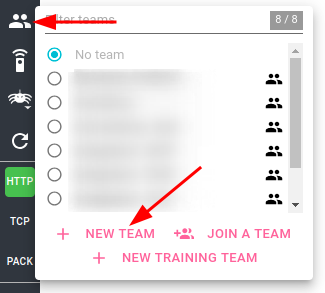
Team creation is done in the team list popin with the New Team button.
The new team details opens with default settings.
- The team is created with a random name (UUID).
- The team does not have any join token.
- Users and settings are blank
- BUT a new Whisperer of UPLOAD type is created automatically, called
Sandbox
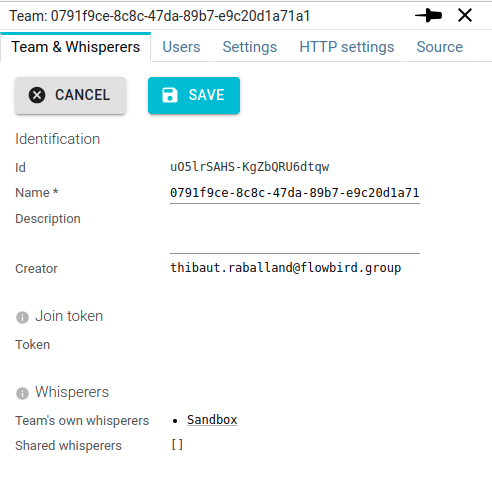
Customize its identification
The first actions are to:
- Adjust the name 😉
- Add a description (option)
info
Team names must be unique in a Spider setup.
Any team member with the Update team right may change the team description or name.
Sandbox Whisperer
An upload Whisperer allows uploading
- packet
.pcapfiles - communications
.jsonfiles
Upload Whisperer data have a much longer retention time period. Typically 30 days or more.
It is pretty useful to keep communications longer for team members.
A classic usage is:
- Export communications from a streaming Whisperer
- Reimport them to an upload Whisperer whenever you want to study or review them