Installing Whisperers
Spider Whisperers are used to capture communications for analysis in Spider.
To create a Whisperer, follow these steps:
A. Create the Whisperer
-
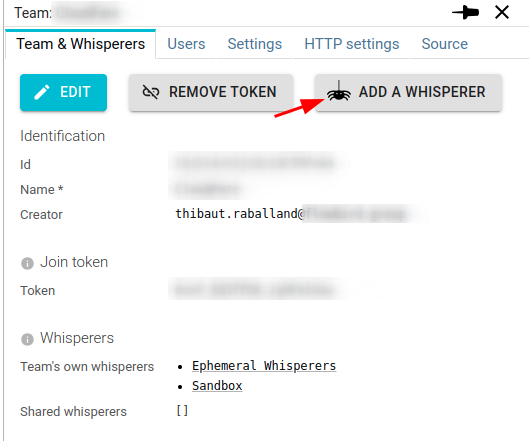
Create the Whisperer on the UI
- For the team
- Or directly for a User

- For the team
-
The
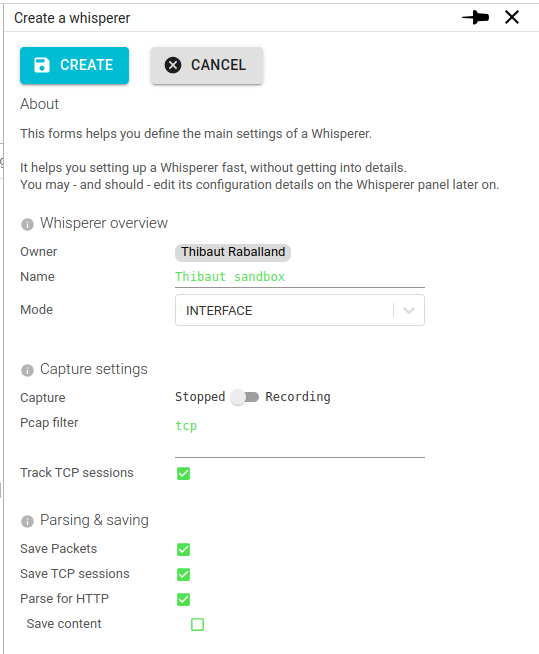
Create a Whispererform opens
-
Define the Whisperer main configuration
- Name - as you wish
- Mode:
INTERFACE - Capture -
Recording - Pcap filter
- Save Packets, Tcp, HTTP content
-
Click
CREATEto create the Whisperer
The Whisperer details opens.
B. Fetch configuration
-
Move to the
Installationtab- The tab has inline instruction to help you to install your new Whisperer.
-
Click on
GENERATE API KEY
- It generates a couple of private / public keys for authentication
- And gives you the private key in a locally generated config file
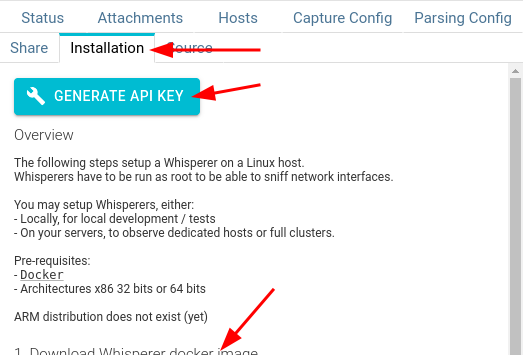
Keep this file safe as it is required for your Whisperer to authenticate with the server.
C. Install the Whisperer an the system to capture
You may setup Whisperers, either:
- Locally, for local development / tests
- On your servers, to observe dedicated hosts or full clusters.
Whisperers may be setup:
- As standalone Docker containers
- As Docker containers attached to another container (Swarm / Compose / ...)
- As sidecars in Kubernetes workloads (PODs)
- As ephemeral containers in Kubernetes workloads 😍
- Or even, as a standalone executables
Whisperers have run in many different physical, virtual hosts and Docker or Kubernetes distributions. But you'll have to test on your own, there is too many variants 🤗
As you've seen, most configuration is not in the infrastructure. So it is easy to test!
Available images
Versioned tags are available, matching the system versions.
Docker images of Whisperers are public.