Sharing agents access to Service Accounts
As for standard users, you may share access to agents and their data to service accounts.
Either:
- Through the service account profile, when you're an administrator
- Or through the agents own
Sharetabs
Via Service Account profile
In the Controllers, Whisperers or Gociphers tabs of the Service Account Profile,
you may select what Agent and data it should have access to.
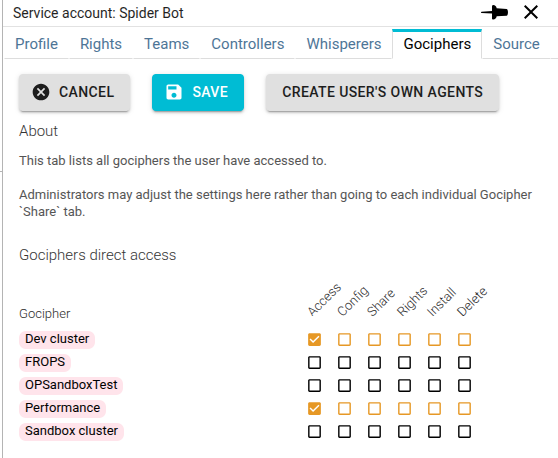
Via Agents own Share tabs
The Share tabs allows you to share access to agents to a service account.
Only users with Share rights may add service accounts.
To add a service account:
- Edit the list
- Click on (+)
- Enter his id
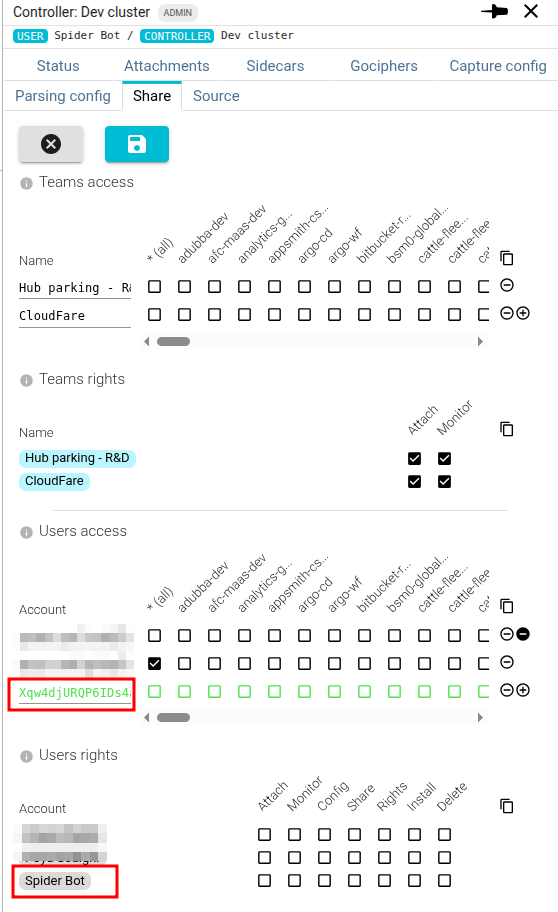
When saving, Spider checks if the id exists.
Once saved, service accounts are displayed as badges with links to their profile.