Configuring a Whisperer
Configuring a Whisperer is made through two different tabs grouping:
Captureconfig, for the agent configurationParsingconfig, for the server parsing configuration

Whisperer Type
Whisperers exist in different types.
The type is defined at the creation or just after, and cannot be changed afterward.
Available types:
| Whisperer type | Description |
|---|---|
UPLOAD | Whisperers dedicated to manual uploaded data (from the UI). They have higher retention duration. |
INTERFACE | Whisperers dedicated to real time streaming capture of data. |
FILE | Whisperers acting like real time but reading data from local pcap files. Used mostly for debugging. |
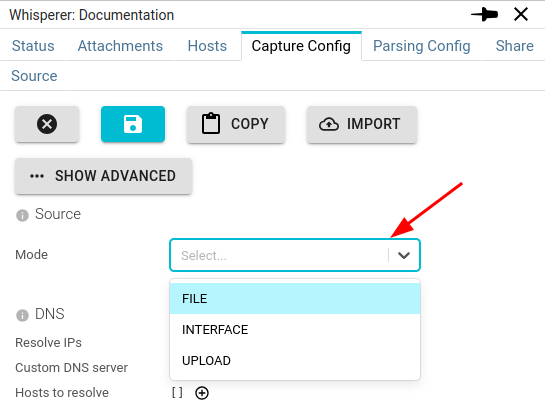
The Whisperer type is set in the Capture Config tab in Source / Mode field:
Import / Export configuration
You may EXPORT the configuration of a Whisperer to IMPORT it when editing the configuration.
The export is in JSON, and may also be edited manually.
Copy configuration between Whisperers
When editing you may click on COPY button to copy the configuration of another Whisperer unto yours.
It's even faster than export/import!
Capture Config
Source
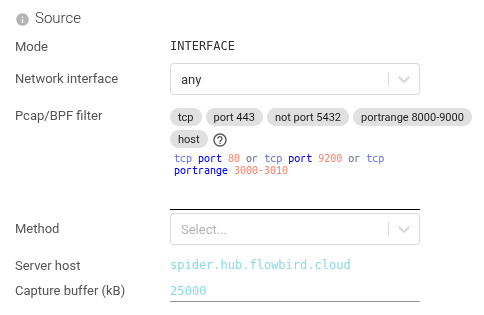
Configure the source for packets capture.
| Setting | Description | Type | Comment |
|---|---|---|---|
| Mode | The type of the Whisperer | List | INTERFACE | FILE | UPLOAD |
| Network interface | The network interface used for capture | List | any is a virtual interface on Linux that aggregates all otherslo is localhostethx are often the interfaces mounted by Kube |
| Pcap filter | The pcap filter to filter what network traffic you want to capture | String | Very important to set right. You often limit to tcp, or tcp port 80, or tcp portrange 3000-3010 |
| Method | Method used to capture the Network. By default AFPACKET_THEN_LIBPCAP is used, which tries AFNET with a fallback to LIBPCAP. AFNET is slightly faster, but may not be always available, depending on your kernel. | List | LIBPCAP | AFPACKET | AFPACKET_THEN_LIBPCAP |
| Server host | Tells what is the host of Spider, not to capture communications going to it. To avoid infinite loops! | Fixed | |
| Capture buffer | Capture buffer of pcap in the Kernel, in kB | Integer | Should often be several thousands. |
BPF / pcap filter editor
The pcap filter field has a dedicated editor:
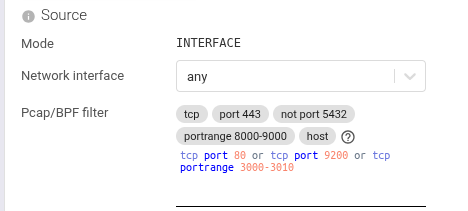
Syntax highlighting - BPF keywords (tcp, udp, host, port, and, or, not), operators, and address literals are colored.
A dense filter like tcp and (host 10.0.0.1 or port 5432) and not port 80 is readable at a glance.
Live parser - The filter is parsed as you type. Syntax errors are flagged inline before you submit - no more rejected captures because of a typo.
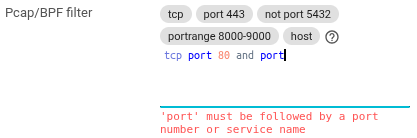
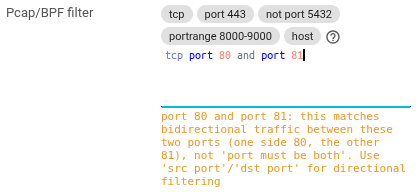
The parser also detects common mistakes, like selecting many ports with and.
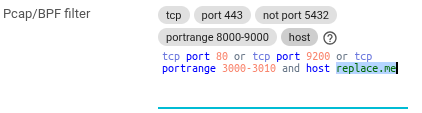
Snippet picker - A snippet picker sits on top of the input. Pick a snippet - "port 443", "portrange 8000-9000", "host" - and it drops into the editor with the port number or hostname preselected, ready to edit or use as-is.
Attachments
Configure attachments made with this Whisperer by a Spider Controller.

| Setting | Description | Type | Comment |
|---|---|---|---|
| Time to live | When set, defines the maximum time an attachment of this Whisperer may be active. | Duration in Sec or Min |
Circuit breakers
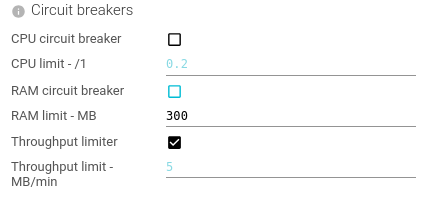
Circuit breakers settings allow to limit Cpu usage and Ram usage of Whisperers on the host they are capturing.
Thus limiting footprint in case of network traffic burst.
| Setting | Description | Type | Comment |
|---|---|---|---|
| CPU circuit breaker | Tells if the Whisperer should stop the capture when its CPU usage is too high. | Boolean | Circuit breakers lasts the duration of stats collection. |
| CPU limit | Set the threshold for the circuit breaker. In percentage. | Float | |
| RAM circuit breaker | Tells if the Whisperer should stop the capture when its RAM usage is too high. | Boolean | |
| RAM limit | Set the threshold for the circuit breaker. In MB. | Integer | |
| Throughput limiter | Tells if the Whisperer should stop the capture when captured traffic is too high. | Boolean | |
| Throughput limit | Set the threshold for the throughput. In MB/min. | Integer |
For LocalAgents Whisperers, only admins may change the Throughput limit, set to 5MB/min by default.
Packets sending
Settings to control the emission of packets.
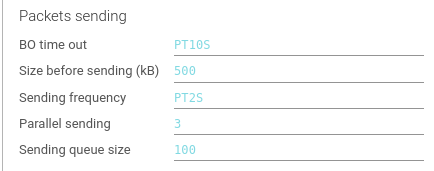
| Setting | Description | Type | Comment |
|---|---|---|---|
| BO time out | Time out threshold when calling POST /packets API. | Duration in S | |
| Size before sending | Size threshold in kB of the buffer of packets before sending to back end. | Integer | |
| Sending frequency | Duration threshold after which the buffer of packets is sent even if not full. | Duration in S | |
| Parallel sending | How many parallel sending of buffers are authorized | Integer | |
| Sending queue size | If not slot for parallel sending is available, the Whisperer will queue the message. When queue is full, new are discarded. | Integer |
When server throughput may not be fast enough for capture load, you should increase Parallel sending setting.
Those values have a direct effect on maximum Whisperer memory size:
queue sizexsize before sending=maximum queue size- Default to 500kB * 100 = 50 MB
DNS
Configures the IP reverse resolving feature.
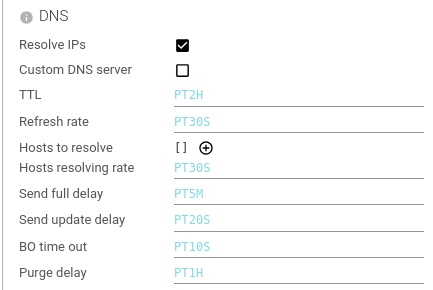
| Setting | Description | Type | Comment |
|---|---|---|---|
| Resolve IPs | Whether the Whisperer should reverse resolve IP addresses to host names. | Boolean | |
| Custom DNS Server | Whether the Whisperer uses the system resolution or a custom DNS server. | Boolean | |
| - DNS host | Host of the custom DNS server. | String | |
| - DNS port | Port of the custom DNS server. | Integer | |
| TTL | How long hostname resolution is kept in cache. | Duration in H | |
| Refresh rate | How often a cached hostname resolution is refreshed. | Duration in S | |
| Send update delay | How often an update of the list of hostnames and IPs is sent to backend. | Duration in S | |
| BO time out | Time out threshold when calling POST /hosts API. | Duration in S | |
| Purge delay | How often do the Whisperer clean the cache for TTL passed resolutions. | Duration in H |
Tcp Sessions
Configures the tracking and sending of Tcp sessions.

| Setting | Description | Type | Comment |
|---|---|---|---|
| Track TCP sessions | Whether the Whisperer should track TCP sessions. If not, it will only send raw packets. | Boolean | Usually, you want this 😊 |
| BO timeout | Time out threshold when calling POST /sessions API. | Duration in S | |
| Sending frequency | Duration threshold after which the buffer of sessions is sent. | Duration in S | |
| Tcp sessions TTL | Time to Live after which an inactive - but not closed - Tcp session is removed from memory. | Duration in M | |
| Send only data packets | When set, a specific - complex - pcap filter is added to capture only data packets & packets required for Tcp sessions tracking. Only packets with data are sent. Reduces Spider CPU usage. Please note that TCP sessions statistics will then be erroneous (IP payload etc.). | Boolean | |
| Sessions sent at once | Max count of Tcp sessions sent by API request. | Integer | |
| Parallel sending | How many parallel sending of buffers are authorized. | Integer | |
| Sending queue size | If not slot for parallel sending is available, the Whisperer will queue the message. When queue is full, new are discarded. | Integer | |
| Max packetLot size | Maximum size of contingent Tcp payload authorized. Usually means a maximum size of request or response. Packets above are sent to Spider but are not taken into account when parsing. Avoids blowing up the servers memory. In Bytes. | Integer |
Filtering
Configures filtering on hostnames to capture packets (from and to) or to avoid.
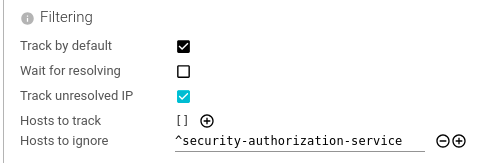
| Setting | Description | Type | Comment |
|---|---|---|---|
| Track by default | Whether the Whisperer tracks (all) IP addresses by default. | Boolean | Set to false when you want to only track certain hostnames |
| Wait for resolving | Whether the Whisperer waits for having resolve the IP address to track its packets. | Boolean | |
| Track unresolved IP | Whether the Whisperer tracks IP addresses it could not resolve. | Boolean | |
| Hosts to track | List of regular expressions (or string) for valid hostnames to track. | Array of Patterns | A whitelist |
| Host to ignore | List of regular expressions (or string) for hostnames to avoid tracking. | Array of Patterns | A blacklist |
An IP resolved to a hostname to track is not re-resolved until the host is not seen for long time (DNS.ttl).
An IP resolved to a hostname not to track is re-resolved every DNS.refreshRate.
When tracking by default, as soon as a host is to ignore, don't track.
When not tracking by default, as soon as a host is to track, do track.
Hostnames filtering is a very powerful feature to limit the volume of data and the CPU usage.
- When you don't need to track packets from or to a hostname, use this.
- When you know the IP of the hosts to ignore, rather use a pcap filter.
Duplicates

When capturing with 2 instances of the same whisperer from both side of the same communication, Spider captures twice packets and TCP sessions.
The following options allow to avoid duplicated communications resources by creating common ids and adding unique checks on server side.
To avoid duplicated packets (when you save them), choose the relevant option on the parsing part of configuration.
| Setting | Description | Type | Comment |
|---|---|---|---|
| Avoid duplicated communications | Whether the Whisperer should generate unique Ids to identify duplicates of packets | Boolean |
Tls Keys

Whisperers can track TLS keys together with a Gocipher agent.
The Whisperer will look for TLS information in the TCP session it captures, and the Gocipher will capture the session TLS secrets.
Due to technical constraints, TLS keys are captured on ALL PORTS. Pcap filter has no effect on TLS capture.
However, you may limit what port to link or not by:
- Not capturing their packets
- Listing the ports to link in the Parsing Config
| Setting | Description | Type | Comment |
|---|---|---|---|
| Track TLS Keys | Whether the Whisperer & Gociphers should track and send TLS secrets to the back office. | Boolean |
Status sending
Configures the monitoring.

| Setting | Description | Type | Comment |
|---|---|---|---|
| Send status | Whether to send Whisperer statistics to the back end. | Boolean | Crucial for monitoring. |
| BO timeout | Time out threshold when calling POST /status API. | Duration in S | |
| Sending frequency | Frequency to send statuses. | Duration in S | 10 / 20s |
Dump packets on client
You may ask the Whisperer to dump .pcap files of packets when capturing.
Used only for internal debugging.

| Setting | Description | Type | Comment |
|---|---|---|---|
| Dump packets | Whether the Whisperer should dump packets to files | Boolean | |
| Buffer size | Size in kB of the files to dump (approx) | Integer | |
| Output path | Output path to store the dumps | String |
Configuration polling

| Setting | Description | Type | Comment |
|---|---|---|---|
| Frequency | Tells how often the Whisperer calls to check a configuration change | Duration in sec. |
Common parsing settings
Parsing options are cached for 5 minutes for INTERFACE Whisperers and 1 minute for UPLOAD Whisperers.
Automatic correlation tags
Following a request across services needs an identifier that is the same on every hop. Most stacks already emit
one - a W3C traceparent from an OpenTelemetry SDK, an X-Request-ID minted by an edge proxy, an X-Correlation-ID
set by an API gateway - but until this release Spider extracted none of them until somebody wrote the rules by hand.
Spider now ships those rules pre-written, under a single tag name: correlationId.
Seeding a new Whisperer
The Whisperer creation form carries an Extract correlation ids switch in the Parsing & saving section,
on by default. Leave it on and the new Whisperer starts extracting correlationId from its first captured packet,
with nothing else configured.
Adding them to an existing Whisperer
Each protocol's tag section carries an Add default correlation tags button. It appends any seeded rule for that
protocol that is not already present, comparing on name, path and pattern - so pressing it twice cannot create
duplicates, which would otherwise inflate the tag's count and cardinality.
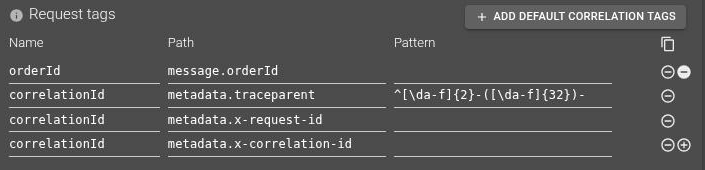
There is deliberately no bulk backfill of existing Whisperers: that would edit your configuration unasked, and
could collide with a correlationId rule you wrote yourself.
What gets seeded
| Protocol | Side | Source | Extracted |
|---|---|---|---|
| HTTP | Request | traceparent header | the 32-hex trace id only |
| HTTP | Request | X-Request-ID header | the whole value |
| HTTP | Request | X-Correlation-ID header | the whole value |
| HTTP | Response | X-Request-ID, X-Correlation-ID headers | the whole value |
| gRPC | Request | traceparent metadata | the 32-hex trace id only |
| gRPC | Request | x-request-id, x-correlation-id metadata | the whole value |
| Kafka | Records | traceparent record header | the 32-hex trace id only |
| Kafka | Records | x-request-id record header | the whole value |
| PostgreSQL | Request | traceparent in a sqlcommenter query comment | the 32-hex trace id only |
Rules sharing one name accumulate into a single deduplicated value list, so one filter selection correlates a chain whichever convention each hop happened to use.
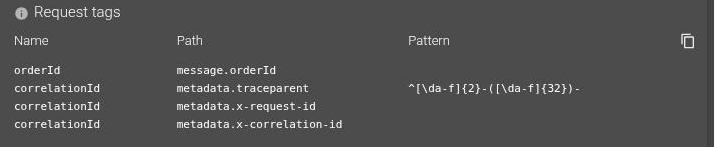
The gRPC request tags of a seeded Whisperer. The three correlationId rules accumulate into one tag; only the
traceparent one needs a Pattern, to capture the stable trace id out of the composite value. orderId alongside
them is a hand-written business tag - the two kinds live side by side and are configured identically.
A traceparent is 00-<32-hex trace id>-<16-hex span id>-<flags>, and the span id changes at every hop - that is
the point of the format. Matching the whole header value would match exactly one hop and never the chain, which is
precisely why the seeded rules capture the trace id segment alone.
The HTTP rules match the raw wire header block, which reaches extraction independently of Save raw headers and
Headers to filter - those govern only what is stored. So the seeded rules work on a Whisperer that saves no
headers at all.
Known gaps
- Redis is not correlated and will not be: RESP has nowhere to carry a propagation header, and no instrumentation puts one there.
- PostgreSQL prepared statements. Extraction is deliberately local to the message that carried the query text, so a cached prepared statement executed many times only carries the identifier on the request that actually prepared it. Every other execution is simply untagged on the PostgreSQL hop - a missing correlation rather than a wrong one.
Once extracted, tell the UI which tag names identify a chain in the
Correlation setting.
Timezone

You may associate a timezone to each Whisperer.
When the Whisperer is selected on the UI, the times of the captured communications are displayed according to this time zone - depending on the settings.
Data storage policy
In Spider configuration, you may define Customisable Data Store Policies.
These defines different available retention periods for Whisperers data.

The Data storage policy of the Whisperer defines how long you want to keep its data.
- The default value is
default(definitive lack of imagination here) - It may be changed at any time in the lifetime of a Whisperer, but existing data will still be associated and managed by the policy active at the time of indexing
- When the setting is set to a Policy that do not exist (any more), the
defaultone is used.
Packets saving
Configures if packets should be saved for analysis.

Spider is built to parse packets in streaming.
You do not need to save packets unless you want to analyze at low packet level.
-
When saving packets,
- Packets are saved to Elasticsearch.
- It requires much CPU and space.
- You may choose to avoid duplicated packets when capturing the two side of the same communication.
- This is costly for ES as it then has to check for if the packet exists when saving. Activate it only when needed.
-
When not saving packets,
- Packets are only kept in memory until they are parsed.
- This prevents reconstructing payload data for TCP or HTTP once the parsing is finished.
- You should definitely activate 'Save content' HTTP option, or else, you won't see the data ;)
Do not save packets:
- when you filter out part of the parsed data, and you don't want the data to be reconstructed,
- or when you don't need to keep packets, to save space and ES resources.
You may activate saving packets only temporarily when needed.
| Setting | Description | Type | Comment |
|---|---|---|---|
| Save Packets | Whether Spider should save packets from this Whisperer. | Boolean | |
| - Avoid duplicated packets | Whether Spider should check for duplicated packets to avoid saving twice the same. | Boolean |
Tcp sessions saving
You may wish not to save TCP sessions in Spider (once the parsing is done). Use this:
- when your parsing quality is good,
- when you don't care of TCP sessions.

| Setting | Description | Type | Comment |
|---|---|---|---|
| Save TCP sessions | Whether Spider should save Tcp sessions from this Whisperer. | Boolean |
When not saving packets, saving Tcp sessions has little interest.
TLS Keys

You may wish to link or not captured TLS secrets and keys to TCP sessions.
You may define if link should be done by default, or if it should be restricted to certain ports.
| Setting | Description | Type | Comment |
|---|---|---|---|
| Link TLS Keys to TCP sessions | Whether this TLS keys captured for this Whisperer should be associated to its TCP sessions. | Boolean | |
| Link by default | Whether Spider should link on all ports by default. | Boolean | |
| Ports to link | Define server ports using TLS encryption. The TCP sessions on those ports will be linked to TLS secrets captured. You may define lists of ports or ranges: 80, 8080, 9200, 3000-3100. | Array of Integers or Integers ranges | |
| Ports to ignore | Define server ports not to link. | Array of Integers or Integers ranges |
Host names
When Whisperer resolves IP addresses to capture hostnames, it can determine automatically a shortname to display based on the FQDN provided by the DNS.
For this, specify one or several regular expression(s) that are used to extract parts of the FQDN, which are then concatenated by '.'. Patterns are executed in order. First one that matches is selected.

| Setting | Description | Type | Comment |
|---|---|---|---|
| Name patterns | List of patterns to transform a FQDN into something shorter, but meaningful. | Array of Patterns |
This is particularly useful to have shorter names on the UI.
- You don't need to see:
myservice.mynamespace.svc.cluster.local - Seeing
myserviceis enough.
The FQDN is kept along the short name, don't worry:
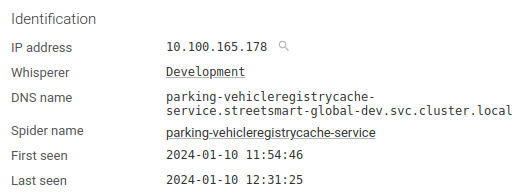
Web traffic parsing
HTTP/1.x, HTTP/2 and gRPC all travel as ordinary TCP connections, and Spider tells them apart on the connection itself rather than by the port they arrive on. Configuring which traffic gets parsed is therefore unified across the three: one list of ports selects which TCP sessions the web parser looks at, and a switch per protocol chooses which of what it detects is saved as a communication.
Web parsing
Configures which TCP sessions should be parsed for web traffic, and which detected protocols are saved.
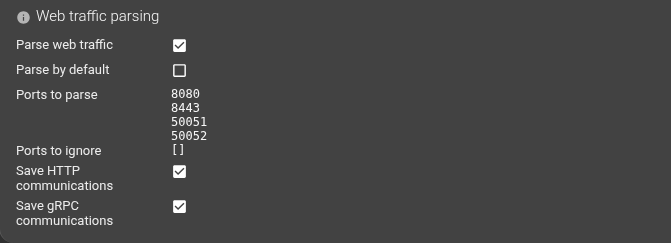
| Setting | Description | Type | Comment |
|---|---|---|---|
| Parse web traffic | Whether this Whisperer is capturing web traffic (HTTP/1.x, HTTP/2, gRPC) that should be parsed. | Boolean | |
| Parse by default | Whether Spider should parse all ports by default. | Boolean | |
| Ports to parse | Define server ports exposing web traffic. The TCP sessions on those ports will be parsed. You may define lists of ports or ranges: 80, 8080, 50051, 3000-3100. | Array of Integers or Integers ranges | |
| Ports to ignore | Define server ports not to parse. | Array of Integers or Integers ranges | |
| Save HTTP communications | Whether the HTTP/1.x and HTTP/2 communications detected on the parsed ports should be saved. | Boolean | |
| Save gRPC communications | Whether the gRPC communications detected on the parsed ports should be saved. | Boolean | Hidden when gRPC is not enabled by your licence |
| Save SSE communications | Whether a text/event-stream response detected on the parsed ports is split into individual stream messages. | Boolean | Hidden when stream message parsing is not enabled |
The parsing log settings are not here: they are per protocol, and stay in the HTTP Parsing and gRPC Parsing sections below.
Ports select sessions, protocols select output. A port no longer belongs to a single protocol: HTTP/1.x, HTTP/2 and gRPC are all detected on the connection itself, so one port may carry any of them. Ports to parse / Ports to ignore decide which TCP sessions the web parser looks at; Save HTTP communications, Save gRPC communications and Save SSE communications decide which of what it detects is kept as a communication.
HTTP/2 needs no configuration of its own. It is detected automatically on the same ports as HTTP/1.x, including over TLS, with no extra setting to turn on.
Behaviour change. Before this release, a port declared for gRPC only that carried plain HTTP/1.1 traffic produced nothing - that traffic was invisible. After this release it produces an HTTP communication, because the port is shared and the protocol is no longer inferred from it. This is the correct outcome, but it changes what an existing Whisperer records: if you see new HTTP volume on a port previously configured as gRPC-only, this is why.
Migration is automatic. Existing Whisperer configurations are migrated when read: the old HTTP and gRPC port lists are merged, Parse web traffic turns on if either the old Parse for HTTP or Parse for gRPC was on, and Save HTTP communications / Save gRPC communications follow the old protocol switches. No operator action is required.
HTTP protocol parsing settings
HTTP parser provides the useful, and complex parsing options.
They allow filtering, but most importantly extracting business knowledge to show it on Spider.
HTTP Parsing
Which TCP sessions are parsed, and whether HTTP output is saved at all, is configured once for all web traffic under Web traffic parsing. This panel shows that the ports are shared, and holds the HTTP parsing log settings.

| Setting | Description | Type | Comment |
|---|---|---|---|
| Ports | Read-only reminder that the ports are shared with gRPC, under Web traffic parsing. | - | Not editable here |
| Save parsing log | Define if the parsing tracking resource should be saved. | Boolean | For Spider troubleshooting only |
| - Keep whole log | Define if we should keep the whole log (may be HUGE) | Boolean | For Spider troubleshooting only |
HTTP filtering
Configures filtering to remove headers, content or whole communication for certain URIs:
- When it is sensitive information (and in production)
- When it is not required to save them (like monitoring requests, healthcheck requests etc.), to save place.
Configures if Spider should save reassembled communication content.
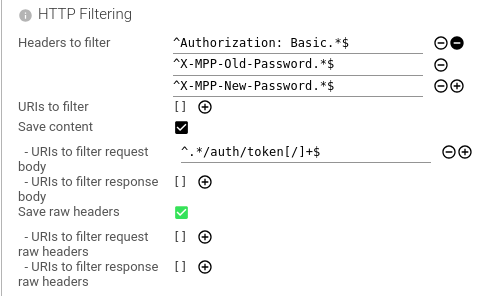
| Setting | Description | Type | Comment |
|---|---|---|---|
| Headers to filter | Define headers to remove in parsed object (like Basic auth header 😉). You may filter by header name or value content. It expects patterns to apply on the HTTP header line. | Array of Patterns | |
| URIs to filter | Filter out communications by URIs. For sensitive communications like auth calls. | Array of Patterns | |
| Save content | Define if the content should be saved within the HTTP resource. Important when not saving packets. | Boolean | |
| - URIs to filter request body | Filter out request body contents by URIs patterns. | Array of Patterns | |
| - URIs to filter response body | Filter out response body contents by URIs patterns. | Array of Patterns | |
| Save raw headers | Define if the raw headers should be saved within the HTTP resource. | ||
| - URIs to filter request raw headers | Filter out request raw headers by URIs patterns. | Array of Patterns | |
| - URIs to filter response raw headers | Filter out response raw headers by URIs patterns. | Array of Patterns |
Regexp are matched case insensitive.
Save content when not saving packets.
Save raw headers when you need to see what was really exchanged (and you don't filter any headers).
Think about filtering ^Authorization: Basic headers to avoid saving passwords in Spider on production.
Request templates
On the parsed HTTP communications, you may define regular expression patterns to name the request.
The name is saved in the communication metadata and is used to aggregate and filter requests.
You define:
- The name of the request:
Ex:Creation of order,createAnOrder,POST /orders/{id}, depending on your style. - The parts of the request to parse to identify it. They will be concatenated, as in their raw format.
- Method
- URI, mandatory, with querystring
- Headers
- Request body
- The regular expression to execute, with /ms flags.
Many regular expressions may be defined. They are matched in order, and the first match is kept.
To create many at once, you may prepare the list in a spreadsheet like Google docs with name, regexp and options in columns.
And then copy paste (without headers)
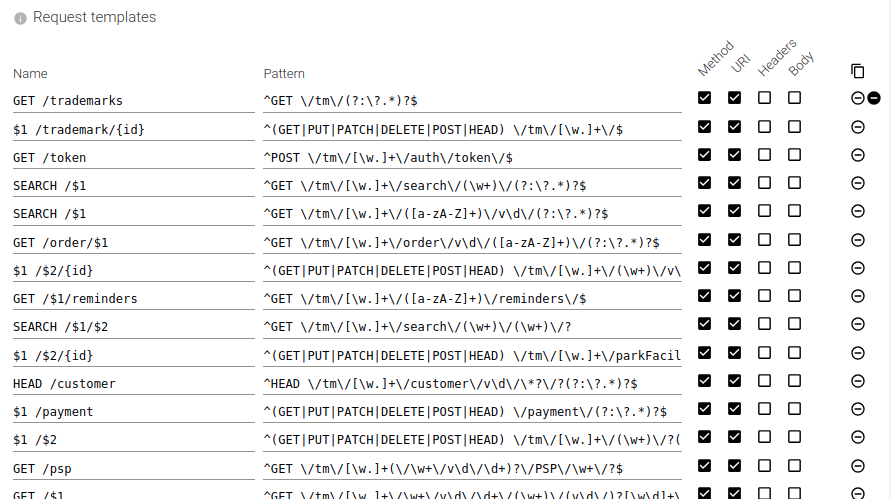
| Setting | Description | Type | Comment |
|---|---|---|---|
| Name | Name of the template. May include placeholder for captured groups 💪. | String | |
| Pattern | Regular expression. When using placeholders, use ^ and $ to enclose the pattern and avoid surprises. | Pattern | |
| Method | Should method be matched. | Boolean | |
| URI | Should URI be matched. | Boolean | |
| Headers | Should headers be matched. | Boolean | |
| Body | Should body be reassembled, transfer decoded, decompressed and matched. | Boolean |
This is one of the most useful feature of parsing.
Obviously this requires CPU, as for the next two ones.
But it is quite reasonable and optimised.
And the value is so much worth it!!
Request tags
On the parsed HTTP communications, you may define regular expression patterns to tag the request.
The tag name and value(s) are saved in the communication metadata and may be used when searching.
You define:
- The name of the tag: Ex: 'ClientName', 'ApiVersion', 'Authenticated'...
- The parts of the request to parse to tag it. They will be concatenated, as in their raw format.
- Method
- URI with querystring
- Headers
- Request body
- The regular expression to execute, with /msg flags.
If the regular expression includes capture group(s), the captured data will be stored as tag value(s).
Without capture group, the tag value will be 'true' (text).
Many regular expressions may be defined. They are all executed, and all the tags are kept.
Alongside the tag value, are also saved:
- The tag count
- How often it matched
- The tag cardinality
- How often it matched with different values
This allows counting (and searching) the number of items in a response, the number of different customers...
To create many at once, you may prepare the list in a spreadsheet like Google docs with name, regexp and options in columns.
And then copy paste (without headers)
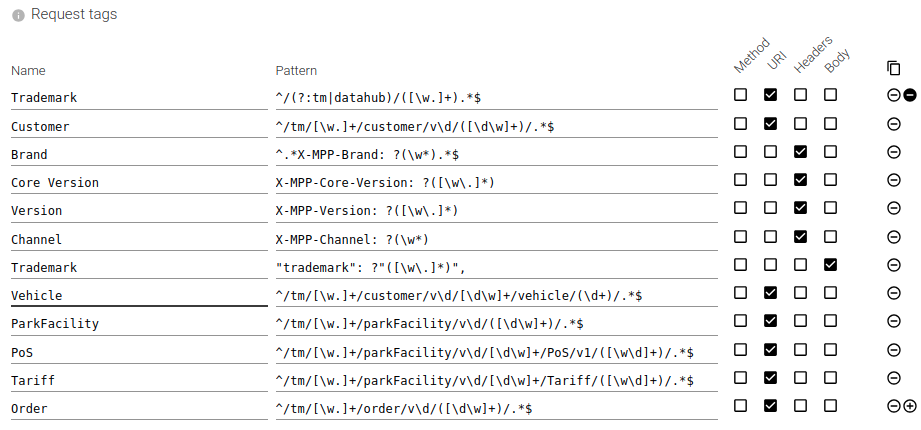
| Setting | Description | Type | Comment |
|---|---|---|---|
| Name | Name of the tag. | String | |
| Pattern | Regular expression to capture the tag. | Pattern | |
| Method | Should method be matched. | Boolean | |
| URI | Should URI be matched. | Boolean | |
| Headers | Should headers be matched. | Boolean | |
| Body | Should body be reassembled, transfer decoded, decompressed and matched. | Boolean |
Together with response tags, these are the most value-adding features of parsing!
Response tags
On the parsed HTTP communications, you may define regular expression patterns to tag the response.
It is the same process as for the request, but on the response.
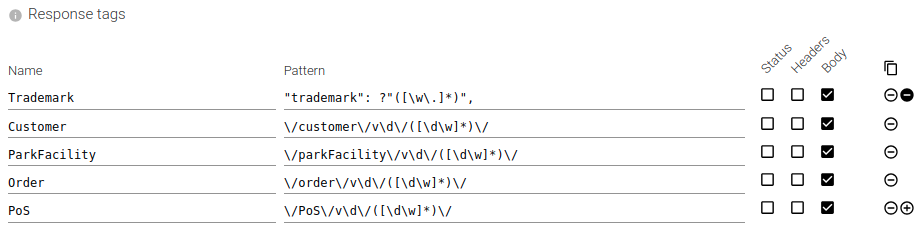
| Setting | Description | Type | Comment |
|---|---|---|---|
| Name | Name of the tag. | String | |
| Pattern | Regular expression to capture the tag. | Pattern | |
| Status | Should status line be matched. | Boolean | |
| Headers | Should headers be matched. | Boolean | |
| Body | Should body be reassembled, transfer decoded, decompressed and matched. | Boolean |
When defining the same tag in request or response, or many times the same tag in either, all extracted values will be associated to the same tag and counted for tag count and cardinality.
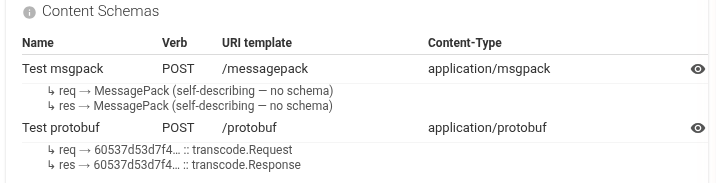
Schema bindings
Schema bindings let Spider decode HTTP request and response bodies into structured JSON for display and extraction.
Each binding maps an HTTP method + URI template + Content-Type to a serialization format (Protobuf, MessagePack, or JSON), so Spider can transcode the raw bytes into a readable format.
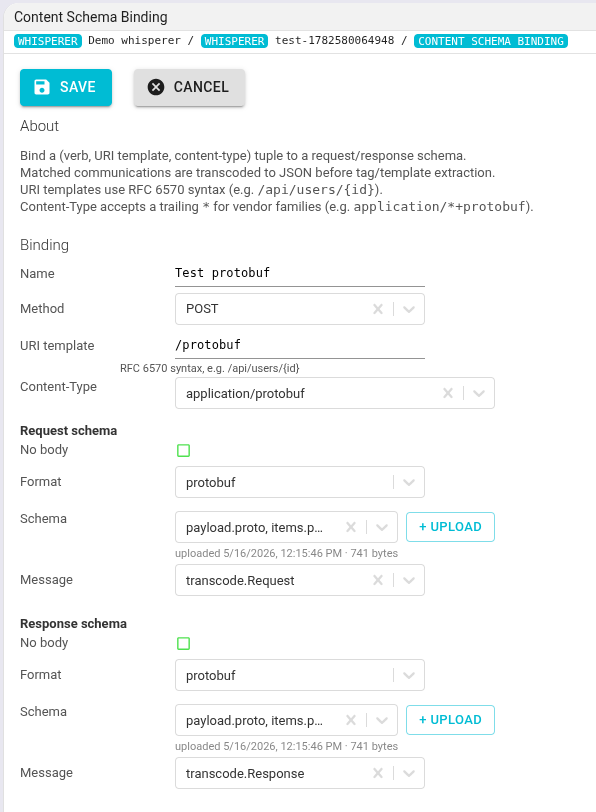
| Setting | Description | Type | Comment |
|---|---|---|---|
| Name | Display name for the binding. | String | |
| Method | HTTP method to match (e.g. GET, POST). Leave empty to match all methods. | List | GET | POST | PUT | DELETE | PATCH | HEAD | OPTIONS | (any) |
| URI template | URI pattern in RFC 6570 format (e.g. /api/users/{id}). Path parameters are treated as wildcards. | String | |
| Content-Type | Content-Type header value to match (e.g. application/x-protobuf). Trailing * matches vendor families. | String | |
| Request format | Serialization format of the request body. | List | protobuf | msgpack | json |
| Request schema | Schema ID for the request body. | String | |
| Request type | Protobuf message type name for the request body. | String | Required when format is protobuf |
| Response format | Serialization format of the response body. | List | protobuf | msgpack | json |
| Response schema | Schema ID for the response body. | String | |
| Response type | Protobuf message type name for the response body. | String | Required when format is protobuf |
Schema bindings are useful when your HTTP API exchanges binary-encoded bodies (protobuf, msgpack) instead of plain JSON. Once bound, Spider decodes the body and displays it as readable JSON, and request/response tags can extract fields from it.
SSE and WebSocket message parsing settings
A Server-Sent Events response and a WebSocket connection are not request/response exchanges - each is one HTTP request that stays open and then carries a long series of messages. Spider parses both into one communication per message, so a feed that runs for hours becomes a searchable series instead of a single communication whose body keeps growing.
Both live in the SSE & WebSocket parser configuration panel, and each has its own switch, its own content flag and its own templates and tags. What differs is the shape of a message:
| SSE | WebSocket | |
|---|---|---|
| Direction | Server to client only | Both directions |
| Transport | HTTP/1.1 and HTTP/2 | HTTP/1.1 (101 upgrade) and HTTP/2 (RFC 8441 extended CONNECT) |
| Recognised by | Content-Type: text/event-stream on the response | The handshake that opened the connection |
| Matchable parts | URI, event type, Last-Event-ID, data | URI, direction, opcode, data |
There is no port list here. SSE and WebSocket both ride the HTTP/web engine: the same ports, the same TCP sessions, the same parser. Which sessions are looked at is decided once under Web traffic parsing; this panel only adds rules for naming and tagging the individual messages.
Turning message parsing on
Neither switch is in this panel - both are in the Web parsing panel, next to their HTTP and gRPC siblings, because all of them gate the same engine.
Save SSE communications
| State | What Spider records |
|---|---|
| On | One Stream message communication per SSE event, plus the HTTP communication for the request that opened the stream (the handshake). |
| Off | One ordinary HTTP communication whose response body is the whole accumulated stream. No per-message split. |
Save WebSocket communications
| State | What Spider records |
|---|---|
| On | One Stream message communication per data frame and for the close frame, in both directions, plus the HTTP communication for the handshake that opened the connection. |
| Off | Only the opening handshake, as an ordinary HTTP communication. The frames are still captured as packets, but are not decoded into messages. |
Turning either on affects connections opened afterwards. A stream already open when you change the setting keeps the behaviour it started with, so a long-lived feed may take a while to switch over.
For WebSocket this is stricter than it sounds: a connection whose handshake was not captured cannot be parsed at all. The frame stream cannot be joined mid-flight, and there is no retroactive fix - restart the client after attaching the agent.
SSE message content
| Setting | Description | Type | Comment |
|---|---|---|---|
| Save SSE content | Whether each message's payload is saved. | Boolean | On by default. Hidden when message parsing is off. |
A flag of its own, not HTTP's Save content. Unlike an ordinary HTTP body, a suppressed SSE payload cannot be rebuilt from packets afterwards - there is no per-event boundary left in the raw bytes once it is gone. So turning off HTTP's Save content does not also have to lose every SSE message payload: Save SSE content governs SSE independently, and defaults to on.
SSE message templates
On the parsed stream messages, you may define regular expression patterns to name the message - the same idea as HTTP request templates, applied per message instead of per request.
The name is saved in the message metadata as req.template, and is used to aggregate and filter messages.
You define:
- The name of the message.
Ex:
Order tick,orderCreated, depending on your style. - The parts of the message to match. They are concatenated, in their raw format.
- The regular expression to execute, with
/msflags.
| Setting | Description | Type | Comment |
|---|---|---|---|
| Name | Name of the template. May include placeholders for captured groups, and $t. | String | |
| Pattern | Regular expression. Must start with ^ and end with $. | Pattern | |
| URI | Should the stream URI be matched. | Boolean | On by default |
| Event | Should the SSE event type be matched. | Boolean | |
| Last-Event-ID | Should the SSE id: field be matched. | Boolean | |
| Data | Should the message payload be matched. | Boolean |
Rules are matched in order and the first match wins.
A message is never left without a name. When no rule matches, the message inherits the template of the HTTP
request that opened the stream. It is never a bare dash - so a stream whose handshake is named GET /orders/feed
produces messages named GET /orders/feed until you write a rule that says otherwise.
$t refines rather than replaces. Writing $t / tick as the name inserts the inherited handshake template in
place of $t, so one rule can specialise the stream's name instead of overwriting it. To match a literal $t,
escape it as $$t.
The matchable parts are not HTTP's method, headers, status and body. A stream message has no method and no
headers of its own - the URI is the identity of the connection, shared by both directions - so the parts offered
are the SSE event fields. A message with no event: field matches as the SSE default event type, message.
SSE message tags
On the parsed stream messages, you may define regular expression patterns to tag the message - the same idea as HTTP request tags, applied per message.
The tag name and value(s) are saved in the message metadata as stats.tags, and may be used when searching.
| Setting | Description | Type | Comment |
|---|---|---|---|
| Name | Name of the tag. Ex: OrderId, Region. | String | |
| Pattern | Regular expression. | Pattern | |
| URI | Should the stream URI be matched. | Boolean | On by default |
| Event | Should the SSE event type be matched. | Boolean | |
| Last-Event-ID | Should the SSE id: field be matched. | Boolean | |
| Data | Should the message payload be matched. | Boolean |
Every rule runs, not just the first match. With capture group(s), the captured data becomes the tag value(s);
without a capture group, the tag value is the text true.
Each message starts from the tags of the HTTP request that opened the stream - its own request tags and any correlation tag - and layers its rules on top:
| Situation | Result |
|---|---|
| A tag name only the handshake carries | Inherited unchanged. |
| A tag name only a message rule produces | Added to that message. |
| Both, same shape (captured values on each side, or a flag on each side) | Merged - captured values union with captured values. |
| Both, different shape (a flag against captured values) | The message's rule replaces the inherited value. |
Inheritance is what makes a stream message correlate with everything around it. A traceparent picked up on the
opening request flows onto every message of that stream, so the messages appear in the same end-to-end trace as
the HTTP, PostgreSQL, Redis, gRPC and Kafka activity they belong to - with no rule to write.
Test both rule sets before applying them with the Templates & Tags playground, which has a stream-message mode alongside the HTTP, PostgreSQL, Redis, gRPC and Kafka ones.
WebSocket message content
| Setting | Description | Type | Comment |
|---|---|---|---|
| Save WebSocket content | Whether each message's payload is saved. | Boolean | On by default. Hidden when WebSocket parsing is off. |
| Save ping/pong frames | Whether control frames become communications of their own. | Boolean | Off by default. |
A flag of its own, not HTTP's Save content. As with SSE, a suppressed WebSocket payload cannot be rebuilt from packets afterwards, so Save WebSocket content governs it independently of HTTP's Save content.
Watch the volume on both of these. A compressed message is stored decompressed, and an inflated payload can be an order of magnitude larger than the bytes on the wire - Save WebSocket content is the only control over that. And a heartbeat every ten seconds is roughly 17 000 documents per day per connection, which is why Save ping/pong frames is off by default; the packets view already shows them.
What is decoded, and what is not. A permessage-deflate message is inflated and readable only when that
direction negotiated no_context_takeover - a permanent limit, not a gap, because the compression window
cannot be carried across a parsing pass. Without it the message keeps its raw payload and a 200 Undecoded
label, which is a truthful record rather than a failure, and one direction may decode while the other does not
on the same connection. socket.io v4 envelopes on text messages are decoded into their packet type,
namespace, event name and ack id. A close frame with no status code is recorded as 1005, never 0 -
0 is the Incomplete status and the two must stay distinguishable.
WebSocket message templates
On the parsed WebSocket messages, you may define regular expression patterns to name the message - the same idea as SSE message templates, matched against the parts a WebSocket message actually has.
| Setting | Description | Type | Comment |
|---|---|---|---|
| Name | Name of the template. May include placeholders for captured groups, and $t. | String | |
| Pattern | Regular expression. Must start with ^ and end with $. | Pattern | |
| URI | Should the connection URI be matched. | Boolean | On by default |
| Direction | Should the message direction be matched. | Boolean | |
| Opcode | Should the frame opcode be matched. | Boolean | |
| Data | Should the message payload be matched. | Boolean |
Rules are matched in order and the first match wins. As with SSE, a message that matches no rule inherits the
template of the HTTP request that opened the connection rather than being left blank, and $t inserts that
inherited template in place of overwriting it.
Direction is the part SSE does not have. An SSE message is always server to client, so the part would be a constant; a WebSocket conversation is genuinely bidirectional, and direction is usually the first thing worth matching on. Opcode takes the slot the SSE event type occupies - it is the message's shape discriminator.
There is no Event and no Last-Event-ID here, and they are not silently ignored: a rule copied from the SSE
list is rejected on save rather than stored and left matching nothing.
WebSocket message tags
On the parsed WebSocket messages, you may define regular expression patterns to tag the message - the same idea as SSE message tags, against the same parts as the templates above.
| Setting | Description | Type | Comment |
|---|---|---|---|
| Name | Name of the tag. Ex: OrderId, Region. | String | |
| Pattern | Regular expression. | Pattern | |
| URI | Should the connection URI be matched. | Boolean | On by default |
| Direction | Should the message direction be matched. | Boolean | |
| Opcode | Should the frame opcode be matched. | Boolean | |
| Data | Should the message payload be matched. | Boolean |
Every rule runs, not just the first match, and inheritance from the opening request works exactly as it does
for SSE message tags - including the traceparent that puts every message of the connection
in the same end-to-end trace as the HTTP, PostgreSQL, Redis, gRPC and Kafka activity around it.
PostgreSQL protocol parsing settings
PostgreSQL parser provides similar parsing options as HTTP, but simpler.
They allow some filtering for safety, but most also, as for HTTP, they allow extracting business knowledge to show it on Spider.
PostgreSQL Parsing
Configures which TCP sessions should be parsed for PostgreSQL communications.
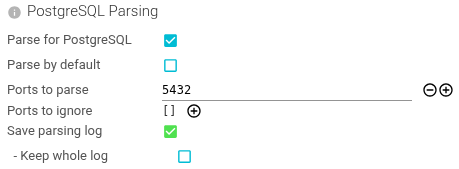
| Setting | Description | Type | Comment |
|---|---|---|---|
| Parse for PostgreSQL | Whether this Whisperer is capturing PostgreSQL communications that should be parsed. | Boolean | |
| Parse by default | Whether Spider should parse all ports by default. | Boolean | |
| Ports to parse | Define server ports exposing PostgreSQL API. The TCP sessions on those ports will be parsed for HTTP communications. You may define lists of ports or ranges: 5432, 5430-5440. | Array of Integers or Integers ranges | |
| Ports to ignore | Define server ports not to parse. | Array of Integers or Integers ranges | |
| Save parsing log | Define if the parsing tracking resource should be saved. | Boolean | For Spider troubleshooting only |
| - Keep whole log | Define if we should keep the whole log (may be HUGE) - only for temporary debug | Boolean | For Spider troubleshooting only |
PostgreSQL filtering
Configures filtering to some specific messages:
- When it is sensitive information (like connections and in production)
- When it is not required to save them (like data rows etc.), to save place.
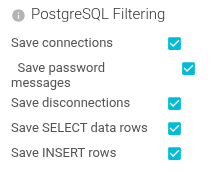
| Setting | Description | Type | Comment |
|---|---|---|---|
| Save connections | Define if we should save Startup requests/responses | Boolean | Saves space when not saved. Connection metadata is included in all coms. |
| Save password messages | When saving Startup, you may want not to save password messages. Saving those could be unsafe if PostgreSQL is not using crypted password handshake. | Boolean | |
| Save disconnections | Not very useful messages ;) | Boolean | |
| Save SELECT data rows | To save space, you may want NOT TO save data received in response of SQL queries. | Boolean | |
| Save INSERT rows | To save space, you may want NOT TO save data sent to be saved in PostgreSQL | Boolean |
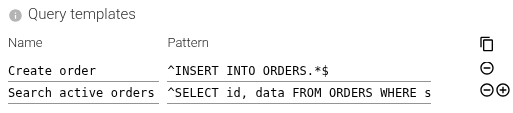
Query templates
On the parsed PostgreSQL communications, you may define regular expression patterns to give a name to the query.
The name is saved in the communication metadata and is used to aggregate and filter requests.
You define:
- The name of the request:
Ex:Creation of order,createAnOrder,POST /orders/{id}, depending on your style. - The regular expression to execute, with /ms flags over the SQL query.
Many regular expressions may be defined. They are matched in order, and the first match is kept.
To create many at once, you may prepare the list in a spreadsheet like Google docs with name, regexp and options in columns.
And then copy paste (without headers)
| Setting | Description | Type | Comment |
|---|---|---|---|
| Name | Name of the template. May include placeholder for captured groups 💪. | String | |
| Pattern | Regular expression. When using placeholders, use ^ and $ to enclose the pattern and avoid surprises. | Pattern |
This is one of the most useful feature of parsing.
Obviously this requires CPU, as for the next two ones.
But it is quite reasonable and optimized.
And the value is so much worth it!!
Request tags
On the parsed PostgreSQL communications, you may define fields to extract from the query or result set.
The tag name and value(s) are saved in the communication metadata and may be used when searching.
You define:
- The name of the tag: Ex: 'ClientName', 'OrderId'...
- The name of the fields to find.
- Format: [table].[column]->>[jsonpath] or [table].[column].[jsonpath] or [table].[column] (no jsonpath)
- If the field is already extracted from the JSON object in the field to check, use dot notation.
- If Spider has to extract the field from the JSON object, use ->>.
- The fields of the request to fetch values from.
- Checked fields, used in WHERE or JOIN conditions
- Insert fields, used to insert data in
- Update fields, updated by the UPDATE command
- Conflict update fields, updated when a conflict happens
The values associated to theses fields will be extracted from the queries, or find the bound values of prepared statements.
Once extracted, they will be saved as tag value(s) for searches, stats etc.
Note that fields computed based on original ones like sum, format, conversions are not supported.
Only original table fields are supported.
Alongside the tag value, are also saved:
- The tag count
- How often it matched
- The tag cardinality
- How often it matched with different values
This allows counting (and searching) the number of items in a response, the number of different customers...
To create many at once, you may prepare the list in a spreadsheet like Google docs with name, regexp and options in columns.
And then copy paste (without headers)
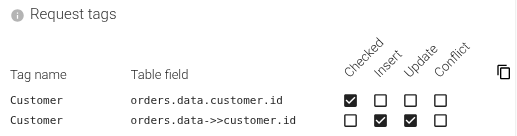
In this example, we want to extract the customer id from any query to Orders, the customer id being stored in a JSONB field data as:
{
  "customer": {
    "id": 123
  }
}
Customer id is used:
- In where conditions, as
data->'customer'->>'id' = $1 - In INSERT or UPDATE statements, as part of the json inserted to
datajsonb column.
The above setting extracts customer id from all queries to Orders table, as a tag to be able to search PostgreSQL communications addressing this specific customer.
| Setting | Description | Type | Comment |
|---|---|---|---|
| Tag name | Name of the tag. | String | |
| Table field | Field to extract the value from. | String | Leave empty when extracting from the query text |
| Pattern | Optional regular expression narrowing the extracted value. | Pattern | Required when Query is on |
| Checked | Should we extract from checked fields values. | Boolean | |
| Insert | Should we extract from inserted fields values. | Boolean | |
| Update | Should we extract from updated fields values. | Boolean | |
| Conflict | Should we extract from updated fields values when conflict. | Boolean | |
| Query | Should we match the raw SQL query text of the request. | Boolean | Runs Pattern over the query text instead of a table field |
Extracting from the query text
The Query option changes what the rule reads: instead of resolving a table field, it runs Pattern over the raw
SQL text of the request and stores capture group 1. This is what lets Spider pull an identifier out of a comment
rather than out of the data, and it is how the seeded
sqlcommenter correlation rule works.
Extraction is deliberately local to the message that carried the query text. An execution of a cached prepared statement inherits no query text, so it produces no tag on that hop rather than a value borrowed from an unrelated request. On a driver that prepares once and executes many times, only the request that actually prepared the statement carries the tag.
Together with response tags, these are the most value-adding features of parsing!
Response tags
On the parsed PostgreSQL communications, you may define what fields you want to extract from the response.
It is the same process as for the request, but on the response.

| Setting | Description | Type | Comment |
|---|---|---|---|
| Tag name | Name of the tag. | String | |
| Table field | Field to extract the value from. | String |
When defining the same tag in request or response, or many times the same tag in either, all extracted values will be associated to the same tag and counted for tag count and cardinality.
Redis protocol parsing settings
Redis parser provides parsing options to decode Redis commands and responses.
They allow filtering, and as for HTTP, they allow extracting business knowledge to show it on Spider.
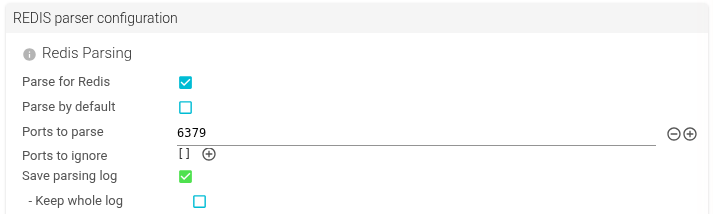
Redis Parsing
Configures which TCP sessions should be parsed for Redis communications.
| Setting | Description | Type | Comment |
|---|---|---|---|
| Parse for Redis | Whether this Whisperer is capturing Redis communications that should be parsed. | Boolean | |
| Parse by default | Whether Spider should parse all ports by default. | Boolean | |
| Ports to parse | Define server ports exposing Redis API. The TCP sessions on those ports will be parsed for Redis communications. You may define lists of ports or ranges: 6379, 6380-6389. | Array of Integers or Integers ranges | Default: 6379 |
| Ports to ignore | Define server ports not to parse. | Array of Integers or Integers ranges | |
| Save parsing log | Define if the parsing tracking resource should be saved. | Boolean | For Spider troubleshooting only |
| - Keep whole log | Define if we should keep the whole log (may be HUGE) - only for temporary debug | Boolean | For Spider troubleshooting only |
Redis content settings
Configures whether Redis command values should be saved.

| Setting | Description | Type | Comment |
|---|---|---|---|
| Save content for writes | Save values in write commands (SET, HSET, LPUSH, etc.) | Boolean | |
| Save content for reads | Save values in read commands (GET, HGET, LRANGE, etc.) | Boolean | |
| Save content for pub/sub | Save content in Pub/Sub messages (PUBLISH, SUBSCRIBE, etc.) | Boolean |
Request templates
On the parsed Redis communications, you may define regular expression patterns to name the request.
The name is saved in the communication metadata and is used to aggregate and filter requests.
You define:
- The name of the request:
Ex:Get user,Set session, depending on your style. - The parts of the request to parse to identify it. They will be concatenated.
- Command (e.g.
GET,SET,HSET) - Key
- Args
- Command (e.g.
Many regular expressions may be defined. They are matched in order, and the first match is kept.

| Setting | Description | Type | Comment |
|---|---|---|---|
| Name | Name of the template. May include placeholder for captured groups 💪. | String | |
| Pattern | Regular expression. When using placeholders, use ^ and $ to enclose the pattern and avoid surprises. | Pattern | |
| Command | Should command be matched. | Boolean | |
| Key | Should key be matched. | Boolean | |
| Args | Should additional arguments be matched. | Boolean |
Request tags
On the parsed Redis communications, you may define regular expression patterns to tag the request.
The tag name and value(s) are saved in the communication metadata and may be used when searching.

| Setting | Description | Type | Comment |
|---|---|---|---|
| Name | Name of the tag. | String | |
| Pattern | Regular expression to capture the tag. | Pattern | |
| Command | Should command be matched. | Boolean | |
| Key | Should key be matched. | Boolean | |
| Args | Should additional arguments be matched. | Boolean | |
| Value | Should the value being written be matched. | Boolean |
Response tags
On the parsed Redis communications, you may define regular expression patterns to tag the response.

| Setting | Description | Type | Comment |
|---|---|---|---|
| Name | Name of the tag. | String | |
| Pattern | Regular expression to capture the tag. | Pattern | |
| Reply type | Should the reply type be matched. | Boolean | |
| Error | Should error messages be matched. | Boolean | |
| Value | Should the returned value be matched. | Boolean |
Schema bindings
Schema bindings let Spider decode raw Redis values into structured JSON for display and extraction.
Each binding maps a Redis key pattern to a serialization format (Protobuf, MessagePack, or JSON), so Spider can transcoding the raw bytes into a readable format.

| Setting | Description | Type | Comment |
|---|---|---|---|
| Name | Display name for the binding. | String | |
| DB | Redis database number to match (e.g. 0, 1). Leave empty to match all databases. | String | |
| Key glob | Glob pattern to match Redis keys (e.g. user:*, session:*:data). | String | |
| Format | Serialization format of the value. | List | protobuf | msgpack | json |
| Schema ID | Schema identifier used for protobuf (matches a schema registered in Spider). | String | |
| Message type | Protobuf message type name within the schema. | String | Required when format is protobuf |
Schema bindings are required for Request and Response tags that use field paths - Spider needs to decode the value before it can extract fields from it.
gRPC protocol parsing settings
gRPC parser provides parsing options to decode gRPC messages using protobuf schemas.
They allow filtering, and they enable extracting business knowledge from structured messages.
gRPC Parsing
Which TCP sessions are parsed, and whether gRPC output is saved at all, is configured once for all web traffic under Web traffic parsing - there is no separate gRPC port list. This panel shows that the ports are shared, and holds the gRPC parsing log settings.

| Setting | Description | Type | Comment |
|---|---|---|---|
| Ports | Read-only reminder that the ports are shared with HTTP, under Web traffic parsing. | - | Not editable here |
| Save parsing log | Define if the parsing tracking resource should be saved. | Boolean | For Spider troubleshooting only |
| - Keep whole log | Define if we should keep the whole log (may be HUGE) | Boolean | For Spider troubleshooting only |
gRPC content settings
Configures whether gRPC message bodies should be saved.

| Setting | Description | Type | Comment |
|---|---|---|---|
| Save content for requests | Save request message bodies. | Boolean | |
| Save content for responses | Save response message bodies. | Boolean |
Request templates
On the parsed gRPC communications, you may define regular expression patterns to name the request.

| Setting | Description | Type | Comment |
|---|---|---|---|
| Name | Name of the template. May include placeholder for captured groups 💪. | String | |
| Pattern | Regular expression. When using placeholders, use ^ and $ to enclose the pattern and avoid surprises. | Pattern | |
| Full method | Should the full method path be matched (e.g. /package.Service/Method). | Boolean | Default: true |
| Metadata | Should gRPC metadata (headers) be matched. | Boolean | |
| Message | Should the request message body (decoded) be matched. | Boolean | Requires a schema binding for the method |
Request tags
On the parsed gRPC communications, you may extract fields from the request using gjson paths.
Tags use gjson paths to navigate a view object assembled for each communication.
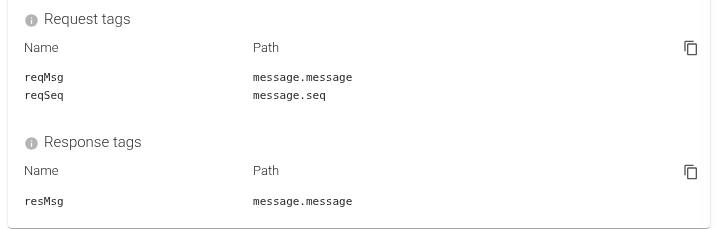
The path navigates a view object with these top-level fields:
| Field | Content |
|---|---|
service | Service name (e.g. UserService) |
method | Method name (e.g. GetUser) |
fullMethod | Full gRPC path (e.g. /pkg.UserService/GetUser) |
metadata.<key> | gRPC request metadata (headers), e.g. metadata.x-tenant |
message.<field> | Decoded request body (requires a schema binding) |
| Setting | Description | Type | Comment |
|---|---|---|---|
| Name | Name of the tag. | String | |
| Path | gjson path into the request view (e.g. service, metadata.x-tenant, message.user.id, message.items.#.id). | String | message.* requires a schema binding for the method |
| Pattern | Optional regular expression narrowing the selected value. | Pattern | See Narrowing a selected value |
Narrowing a selected value
A gjson path selects a value whole, which is not always what you want: a W3C traceparent carries a stable trace
id and a per-hop span id in one string, an Authorization metadata entry carries a scheme and a token, a compound key
carries a tenant and an id. The optional Pattern column narrows what the path selected.
| Pattern | Effect |
|---|---|
| Empty | The selected value is stored whole. This is the historical behaviour, unchanged. |
| With a capture group | Capture group 1 replaces the value. A value the pattern does not match is dropped, not stored raw. |
| Without a capture group | Acts as a filter: the selected value is kept when it matches and dropped otherwise. |
A pattern that does not compile makes the rule inert, and is reported as an error in the playground.
The seeded correlation rules are exactly this: a path selecting metadata.traceparent,
narrowed by ^[\da-f]{2}-([\da-f]{32})- to the trace id.
Response tags
On the parsed gRPC communications, you may extract fields from the response using gjson paths.
The path navigates a view object with these top-level fields:
| Field | Content |
|---|---|
grpcStatus | gRPC status code integer (0 = OK) |
grpcStatusName | gRPC status name (e.g. OK, NOT_FOUND, INTERNAL) |
grpcMessage | gRPC error message string (when status ≠ OK) |
metadata.<key> | Trailing gRPC metadata (headers) |
message.<field> | Decoded response body (requires a schema binding) |
| Setting | Description | Type | Comment |
|---|---|---|---|
| Name | Name of the tag. | String | |
| Path | gjson path into the response view (e.g. grpcStatusName, grpcMessage, message.items.#, message.status.code). | String | message.* requires a schema binding for the method |
| Pattern | Optional regular expression narrowing the selected value. | Pattern | See Narrowing a selected value |
Schema bindings
Schema bindings let Spider decode gRPC message bytes into structured JSON for display and extraction.
Each binding maps a service/method pattern to request and response schemas (typically protobuf).

| Setting | Description | Type | Comment |
|---|---|---|---|
| Name | Display name for the binding. | String | |
| Service pattern | Regex pattern to match the gRPC service name (e.g. .*\.UserService). Leave empty to match all. | String | |
| Method pattern | Regex pattern to match the gRPC method name (e.g. Get.*). Leave empty to match all. | String | |
| Request format | Serialization format of the request message. | List | protobuf | msgpack | json |
| Request schema | Schema ID for the request. | String | |
| Request type | Protobuf message type for the request. | String | |
| Response format | Serialization format of the response message. | List | protobuf | msgpack | json |
| Response schema | Schema ID for the response. | String | |
| Response type | Protobuf message type for the response. | String |
Schema bindings are required for Request and Response tags - Spider needs to decode the protobuf message before it can extract fields from it.
Kafka protocol parsing settings
Kafka parser provides parsing options to decode Kafka Produce and Fetch operations.
They allow filtering, and they enable extracting business knowledge from record payloads.
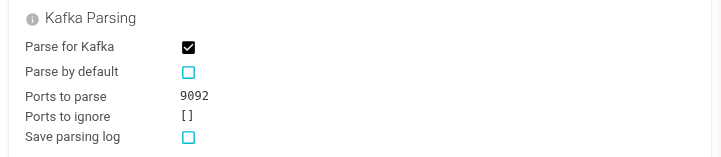
Kafka Parsing
Configures which TCP sessions should be parsed for Kafka communications.
| Setting | Description | Type | Comment |
|---|---|---|---|
| Parse for Kafka | Whether this Whisperer is capturing Kafka communications that should be parsed. | Boolean | |
| Parse by default | Whether Spider should parse all ports by default. | Boolean | |
| Ports to parse | Define server ports exposing Kafka brokers. The TCP sessions on those ports will be parsed for Kafka communications. You may define lists of ports or ranges: 9092, 9093. | Array of Integers or Integers ranges | Default: 9092 |
| Ports to ignore | Define server ports not to parse. | Array of Integers or Integers ranges | |
| Save parsing log | Define if the parsing tracking resource should be saved. | Boolean | For Spider troubleshooting only |
| - Keep whole log | Define if we should keep the whole log (may be HUGE) - only for temporary debug | Boolean | For Spider troubleshooting only |
Kafka content settings
Configures whether Kafka record key/value bytes should be saved.

| Setting | Description | Type | Comment |
|---|---|---|---|
| Save content for produces | Save record content (key/value) from Produce requests. | Boolean | |
| Save content for fetches | Save record content (key/value) from Fetch responses. | Boolean |
Request templates
On the parsed Kafka communications, you may define regular expression patterns to name the request.

| Setting | Description | Type | Comment |
|---|---|---|---|
| Name | Name of the template. May include placeholder for captured groups 💪. | String | |
| Pattern | Regular expression. When using placeholders, use ^ and $ to enclose the pattern and avoid surprises. | Pattern | |
| Command | Should the Kafka command (e.g. Produce, Fetch) be matched. | Boolean | Default: true |
| Topic | Should the topic name be matched. | Boolean | Default: true |
| Client ID | Should the client ID be matched. | Boolean | |
| Message | Should the decoded record value be matched. | Boolean | Requires a schema binding for the topic |
Request tags
On the parsed Kafka communications, you may extract fields from the Produce request using gjson paths.
Tags use gjson paths to navigate a view object assembled for each communication.

The path navigates a view object with these top-level fields:
| Field | Content |
|---|---|
command | Kafka command (e.g. Produce) |
clientId | Kafka client ID |
topic.0 | First topic name (e.g. orders) |
records.N.key | Decoded key of record N (requires a schema binding) |
records.N.headers.<key> | Record header of record N (e.g. records.#.headers.traceparent). No schema binding needed - headers are plain wire bytes. |
records.N.value.<field> | Field from decoded value of record N (requires a schema binding) |
Use gjson array queries to span all records: records.#.value.customerId extracts customerId from every record.
| Setting | Description | Type | Comment |
|---|---|---|---|
| Name | Name of the tag. | String | |
| Path | gjson path into the request view (e.g. command, topic.0, records.0.value.order.id, records.#.value.customerId). | String | records.*.value.* requires a schema binding for the topic |
| Pattern | Optional regular expression narrowing the selected value. | Pattern | See Narrowing a selected value |
Response tags
On the parsed Kafka communications, you may extract fields from the Fetch response using gjson paths.
The path navigates a view object with these top-level fields:
| Field | Content |
|---|---|
statusCode | HTTP-equivalent status code (200 = OK, 400 = error) |
statusText | Status description |
errorCode | Kafka error code (0 = success) |
topic.0 | First topic name |
records.N.value.<field> | Field from decoded value of record N (requires a schema binding) |
| Setting | Description | Type | Comment |
|---|---|---|---|
| Name | Name of the tag. | String | |
| Path | gjson path into the response view (e.g. statusCode, errorCode, records.#, records.0.value.status). | String | records.*.value.* requires a schema binding for the topic |
| Pattern | Optional regular expression narrowing the selected value. | Pattern | See Narrowing a selected value |
Schema bindings
Schema bindings let Spider decode Kafka record bytes into structured JSON for display and extraction.
Each binding maps a topic pattern to a serialization format. Spider supports Protobuf, MessagePack, JSON, and Avro - including Confluent Schema Registry wire-format detection.

| Setting | Description | Type | Comment |
|---|---|---|---|
| Name | Display name for the binding. | String | |
| Topic glob | Glob pattern to match Kafka topic names (e.g. orders-*, user.events). Leave empty for all. | String | |
| Side | Which part of the record to decode. | List | key | value | (both) |
| Registry ID | Confluent Schema Registry ID embedded in the record wire format. Overrides format/schema ID. | Integer | Optional - only needed for Confluent wire format |
| Format | Serialization format of the record. | List | protobuf | msgpack | json | avro |
| Schema ID | Schema identifier registered in Spider. | String | |
| Message type | Protobuf or Avro message type name within the schema. | String | Required when format is protobuf |
Schema bindings unlock templates and tags on record content - Spider must decode the bytes before it can match patterns or extract field values.
When records carry the Confluent wire-format prefix (magic byte 0x00 + 4-byte schema ID), Spider auto-detects the schema ID embedded in the record. You may define a binding with a matching Registry ID to explicitly map that ID to a schema registered in Spider.
Templates & Tags playground
The Whisperer configuration panel has a Playground section that lets you immediately test your Templates and Tags configuration on historical data, without waiting for the Whisperer to reload.
It takes a configurable number of the first items (1–50, default 10) from the current filtered list and runs Templates and Tags extraction on them. It shows immediately which Templates and Tags match, what values they extract, and for each tag the match count and cardinality (number of distinct values) - allowing you to validate or adjust your configuration on the spot.
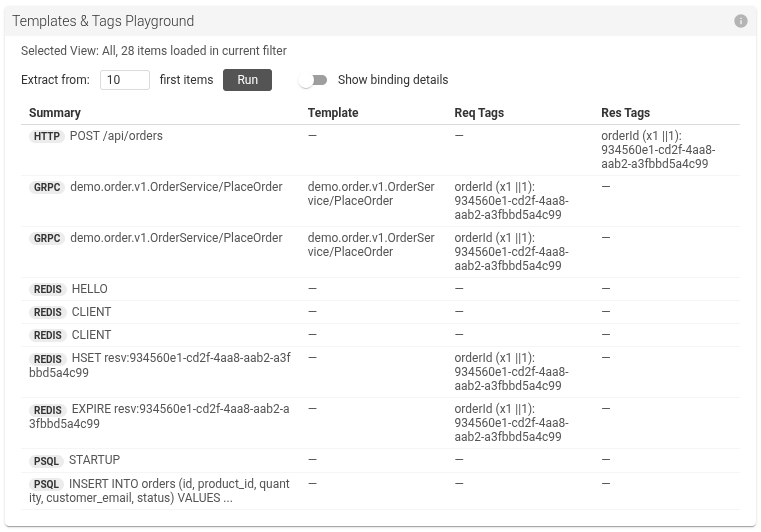
Before this feature, testing a new template required:
- pushing the config,
- waiting for the Whisperer to reload,
- capturing some traffic,
- waiting for the configuration to apply on the backend,
- then checking if the template or tags matched.
Now you click Run over history data and see the result immediately.
The playground works for HTTP, PostgreSQL, Redis, gRPC, and Kafka parsing configurations.
When schema bindings are configured, the playground also runs the transcoding step - record bytes are decoded before templates and tags are evaluated. This lets you validate that your bindings decode correctly and that your tags extract the right fields, all from one place.
Show binding details
The playground result table has a Show binding details toggle.
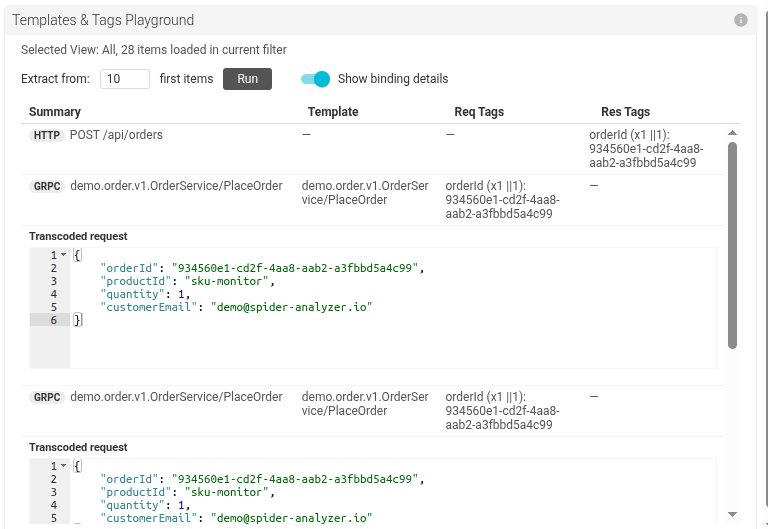
When enabled, each result row expands to reveal:
- Schema resolution - which binding matched the item (by name), or a clear error if no binding matched or the schema was invalid. This is shown per direction (request and response independently).
- Transcoded body - the decoded request and/or response payload rendered as a JSON tree, exactly as Spider stores and displays it.
Binding errors are always visible, even with the toggle off - you will never silently miss a misconfigured binding.
Use this toggle to debug schema bindings: if the transcoded body is missing or wrong, the resolution line tells you whether the binding matched at all and which one was selected.
This feature requires that the Whisperer is configured to save its complete data:
- HTTP: Raw headers and body
- PostgreSQL: INSERT and SELECT data rows
- Redis / gRPC / Kafka: Content saving enabled (so raw bytes are available to decode)