Installing Spider Gocipher
A Gocipher is installed automatically in the Cluster where Spider is setup.
But you may install it as standalone in any other cluster!
You have two ways to install the Gocipher in Kubernetes.
- An easy, one line installation. That may be used for testing.
- A more 'standard' one, using a configuration file.
Both installations are described and use the Installation tab of the Gocipher details:
You may also install and use a Gocipher outside Kubernetes, as a standalone, by using directly its executable.
You cannot delete or reinstall the local-controller setup in Spider own cluster.
UI
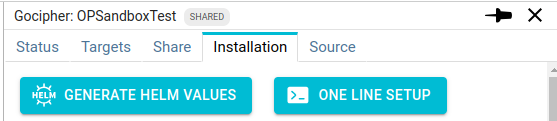
Clicking on any of the buttons regenerate the API key of the Gocipher, invalidating the previous one.
One Line
When clicking on the ONE LINE SETUP button, a command line is copied in your clipboard.
Pasting it in a shell configured to execute Helm on your Kubernetes cluster will install a Gocipher
with default settings.
Example of generated command:
helm upgrade spider-gocipher \
  --repo https://repository.floocus.com/helm/ spider-gocipher \
  --set gocipher=JfavkPIBTTekbSJdE5SHQQ \
  --set privateKey='-----BEGIN RSA PRIVATE KEY-----\\nMIICXAIB...ItcRSuoAIpol4R9tWZbzaA6kk=\\n-----END RSA PRIVATE KEY-----' \
  --set spiderConfigURI=http://spider.hub.company.com/ciphers/v1/gociphers/JfavkPIBTTekbSJdE5SHQQ/config?view=client \
  --namespace spider-controller \
  --create-namespace \
  --install
The Gocipher needs to be setup in the Controller namespace as it communicates with it directly with its service name.
Helm values.yaml file
Clicking on the other button GENERATE HELM VALUES, Spider generates the base of the values.yaml file required to use Helm:
---
gocipher: JfavkPIBTTekbSJdE5SHQQ
privatePem: '-----BEGIN RSA PRIVATE KEY-----\nMIICXQIBAAKBgQCfXBWrzSLC6kF...BDD55pKw56q\n-----END RSA PRIVATE KEY-----'
spiderConfigURI: http://spider.hub.company.com/ciphers/v1/gociphers/JfavkPIBTTekbSJdE5SHQQ/config?view=client
To use it, first, you need to register Floocus Helm repository:
$ helm repo add floocus https://repository.floocus.com/helm
You may check latest versions available with:
$ helm search repo floocus
Then, use the values.yaml file to install:
helm upgrade spider-gocipher floocus/spider-gocipher \
  -f ./values.yaml \
  --namespace spider-controller \
  --create-namespace \
  --install
That's all!
The Gocipher connects to Spider, and it will be used to capture TLS secrets 😀.
Customisation
Version
gocipher:
  image:
    tag: 2024-10-15
You may define the Gocipher version. The version is linked to the system version of Spider.
Others
You may check the available values in values.yaml file for extra 'standard' configuration options.
- hostAliases
- affinity
- toleration
- ...
$ helm show values floocus/spider-gocipher
Gocipher standalone deployment
This deployment is meant 'standalone' as it is running outside Kubernetes. But the Gocipher still works only when connecting to Spider server.
Download
You may download the Gocipher executable on official Floocus repository, choosing the archive that matches the architecture of the machine you want to observe:
https://repository.floocus.com/bin/gocipher-x86_64/<version>/gocipher.tar.xz
https://repository.floocus.com/bin/gocipher-aarch64/<version>/gocipher.tar.xz
aarch64 archives are published from version 1.9.5 on.
The changelog gives links to the latest releases associated with their SHA-256 hash to check that you have the official package.
Content
Gocipher comes with few siblings in its .xz package. These executable are used to extract OpenSSL version of the targes. Java applications need no extra binary: the JVM agent is embedded in the gocipher binary and copied temporarily into the target container's /tmp when it is attached.
| Binary | Description |
|---|---|
gocipher | Gocipher main binary |
nsExe-libc | Used to call node.js in the container own namespace to get its OpenSSL version. Libc version. |
nsExe-musl | Same as above for Alpine containers. |
ossl_version-libc | Used to bind to libssl.so of the container to get OpenSSL version. Libc version. |
ossl_version-musl | Same as above for Alpine containers. |
Configuration
Gocipher requires 2 configuration files, in current working directory, to run as standalone:
config.jsonholding the same configuration as the values, in JSON:
{
  "gocipher": "H5ZyP60dTt6ySEVgXW69Dw",
  "spiderConfigURI": "http://spider.hub.company.com/ciphers/v1/gociphers/H5ZyP60dTt6ySEVgXW69Dw/config?view=client",
  "privatePem": "-----BEGIN RSA PRIVATE KEY-----\nMIICWwIBAAKBgQCOD...g50lQMe3b5Z/AQ==\n-----END RSA PRIVATE KEY-----"
}
toWatch.jsonholding a list of targets to watch
[
  {
    "whisperer": "oWl09MaiTVOz6Kuk7H9eOg",
    "target": "containerd://1671fd1f5865becf6b4fa63c684b149711279ea897bb3db086d166abb889cede"
  }
]
Targets to watch are a couple: whisperer + target.
whispereris the id of the whisperer capturing the network on the same host, and for which we want the TLS keys,targetis the... target
Target are URIs like that identify the executable / OpenSSL library that you want to watch.
Options are:
| URI | Description |
|---|---|
containerd://{id} | Target is a container running with containerd. Gocipher will look for it in /proc, find all running processes, and hook inside their OpenSSL library, their Go crypto/tls or, for a JVM, load its capture agent (Java applications). |
docker://{id} | Same as above, with docker runtime. |
pid://{number} | Target is a running process. Gocipher will look for it in /proc, find all running processes, and hook inside their OpenSSL library, Go crypto/tls or JVM. Gocipher will only capture secrets from this PID. |
file://{pathToExecutable}file://{pathToLibSsl.so} | Target is an executable or OpenSsl library. Gocipher will open it and hook inside. Gocipher will capture all secrets... |
When used withing Kubernetes, Gociphers are asking targets to Controllers, that send a list of containerd or docker
targets, together with metadata describing the container: namespace, pod, parents.
Run
To run Gocipher as standalone, unzip the package, and launch it as any other program.
./gocipher
Run as a Docker container
Gocipher is also published as a multi-arch (linux/amd64, linux/arm64) container image. Use it on a machine running Docker,
with the same two files as above (config.json and toWatch.json), here named gocipher-config.json and toWatch.json:
docker run -d \
  --privileged \
  --pid=host \
  --network host \
  --restart unless-stopped \
  -e "CONFIG=""$(cat ./gocipher-config.json)""" \
  -e TO_WATCH=/config/toWatch.json \
  -v "$(pwd)/toWatch.json:/config/toWatch.json:ro" \
  registry.gitlab.com/spider-analyzer/public-images/gocipher
--privilegedis required: Gocipher loads eBPF probes, which need to lock memory. Without it, it stops at startup.--pid=hostlets the container see the host processes, so thatpid://,docker://andcontainerd://targets work.--network hostlets it reach the Spider server.CONFIGholds the configuration JSON (inline, not a path).TO_WATCHis the path, in the container, of the watch list.
A file:// target is resolved inside the container. To hook an executable or libssl.so of the host, use a pid://
target, or mount the file in the container with -v.