TLS sessions
Concept
Applicative level communication in a TCP session may be enciphered using TLS.
TLS is well described in Wikipedia.
Spider is able to capture TLS secrets used to encrypt and decrypt the TLS records in a TCP session.
These secrets are used in parsing services to decipher the encrypted content before parsing the applicative protocol.
This is managed completely behind the scenes, and the TLS session information is not stored in Spider.
Should you want to see, study or debug a TLS session, you may do it in the TCP content tab. As show below.
TLS secrets capture and link
TLS secrets are captured by Gociphers agents and then linked to their related TCP session.
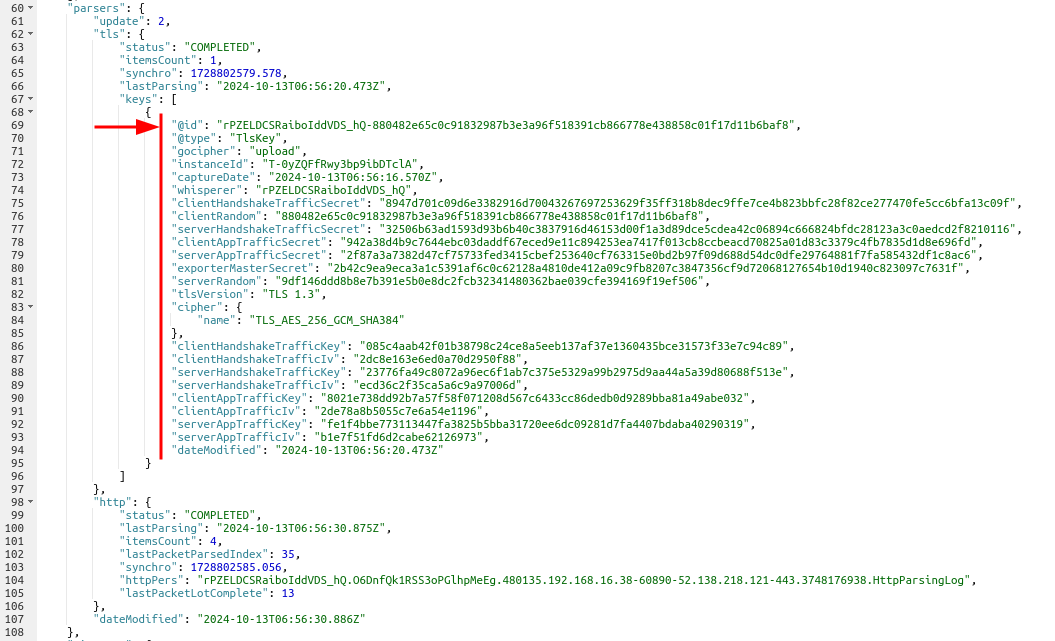
You may find them in the TCP session resource:
- The
*Secret,clientRandom,serverRandom,cipher.nameandtlsVersionare the values captured from the process memory - from OpenSSL, or from Go's owncrypto/tls(goTLS) stack. For key-log-only sources such as goTLS, theserverRandomandcipher.nameare recovered from the cleartextServerHelloon the wire. - The
*Keyand*Ivare the keys and crypto initialisation vectors derived from the secrets in Spider backend. - The latter are used to decrypt the TLS records and content
Analysing the TLS session
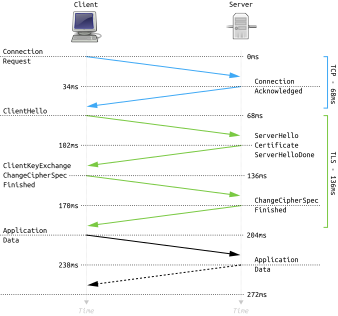
The TLS session is best described as a diagram (from Wikipedia):
You may study the handshake of the TLS session in TCP content tab of the TCP session:
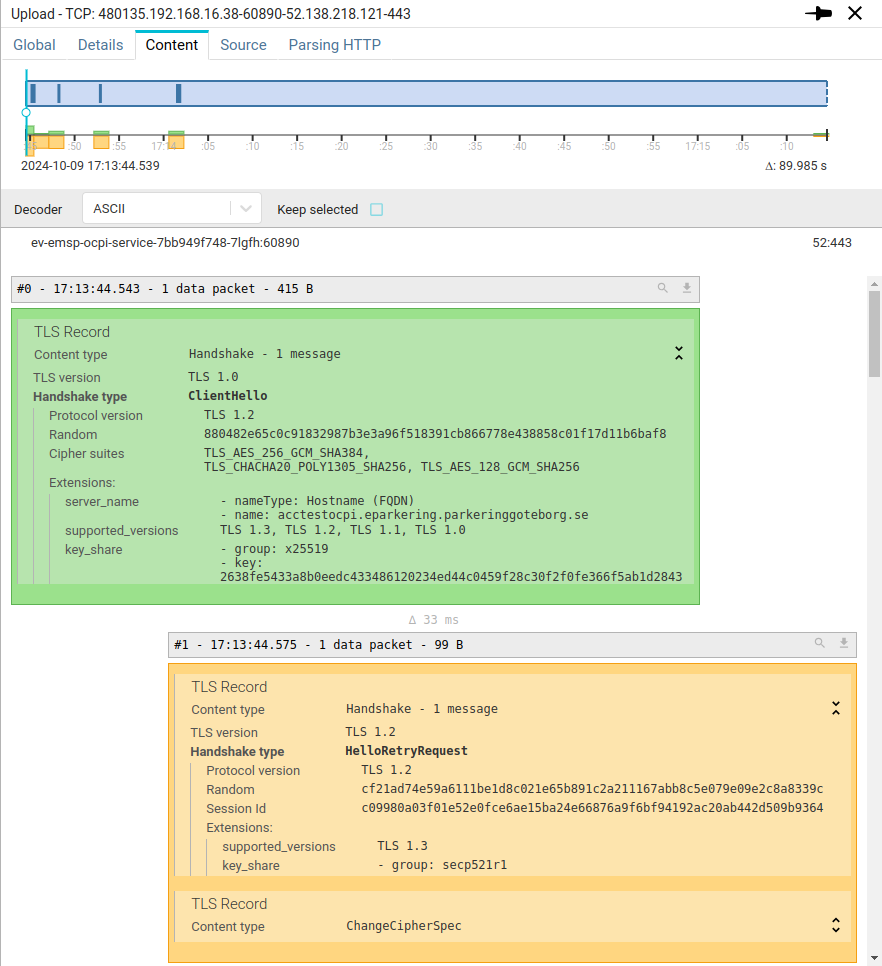
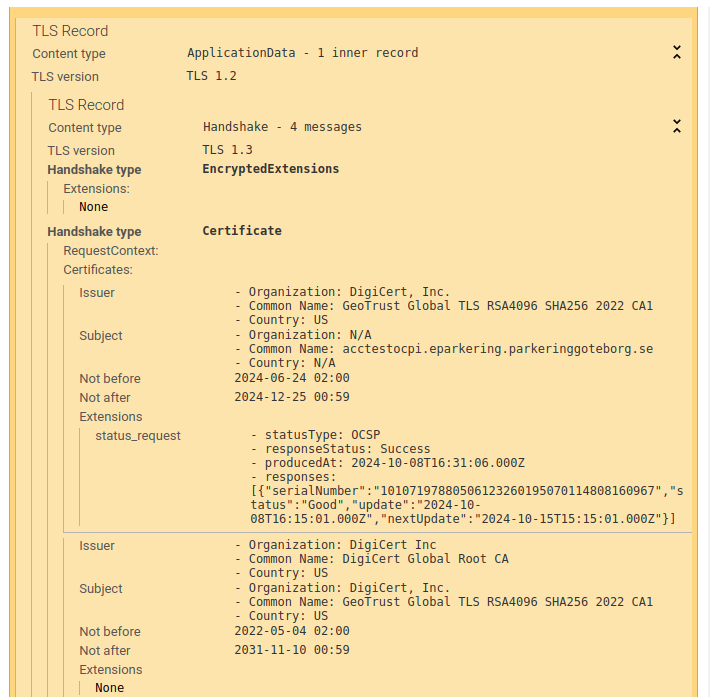
Spider parses the TLS records to extract the most relevant information allowing to understand and even debug the handshake. Encrypted TLS records are decrypting live and parsed the same way, while keeping the structure of the messages.
An encrypted handshake message may then include any Handshake records inside it:
Application data records are represented with their aggregated deciphered payload below:
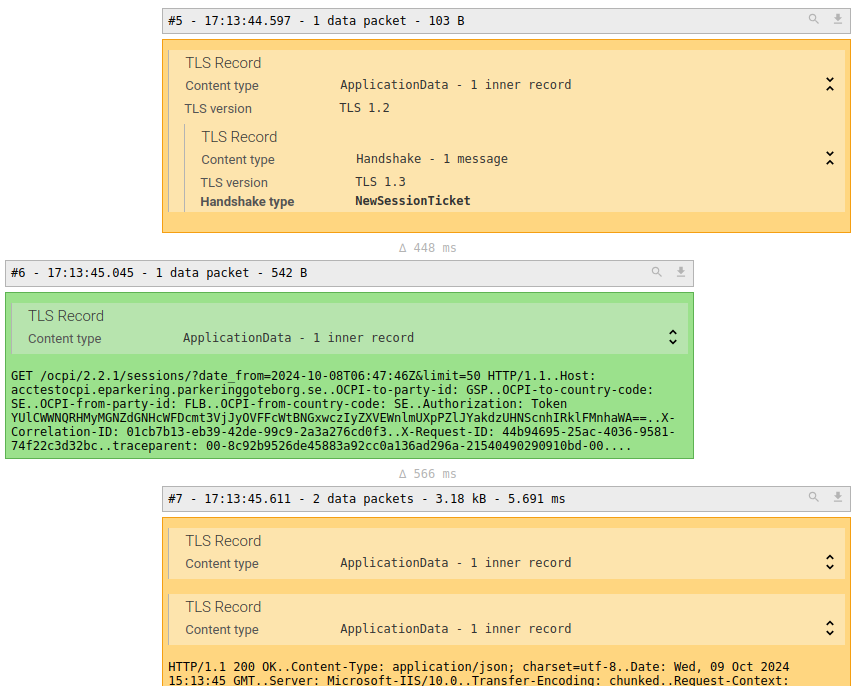
You may then apply the TCP content decoder plugins to decode the deciphered data:
- HTTP
- Redis
- MQTT
- ... and any other available plugin
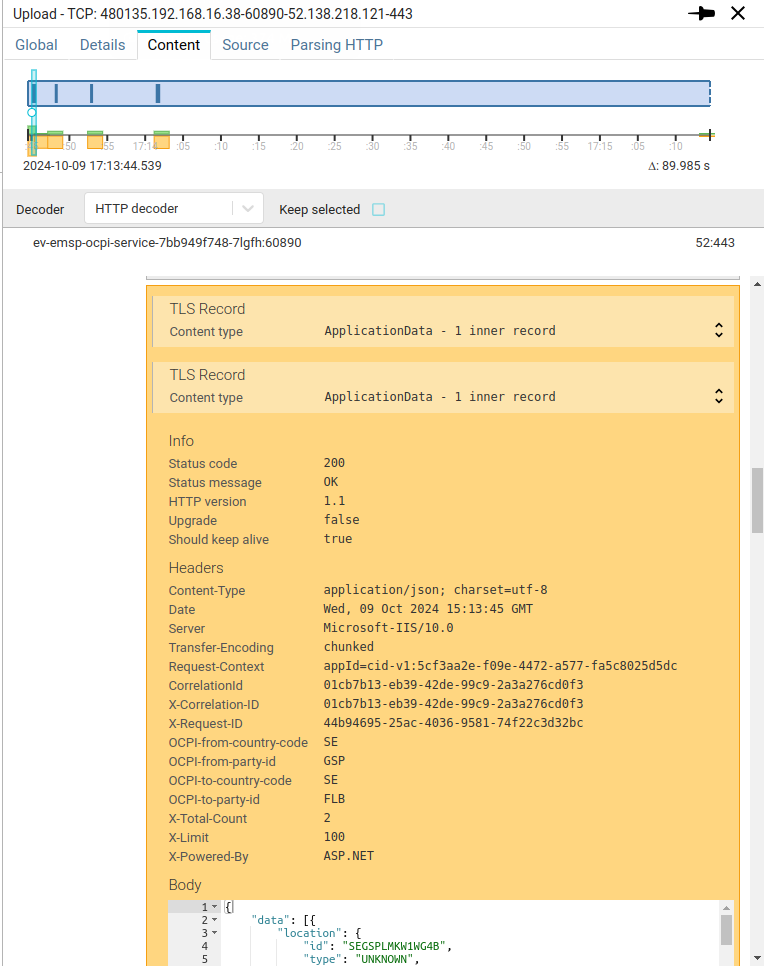
Your TLS communications have no secret for you anymore 😍
Security concerns
Do decrypt TLS sessions, Spider does not hack the session, nor perform brute force.
It extracts TLS secrets directly from the process memory using eBPF kernel plugin technology - from OpenSSL, or from Go executables using the standard library crypto/tls (goTLS).
To be able to do it, you need to give Spider high level permissions on your Linux hosts.
Make sure that you are allowed to do it!
Technology
Concept
Spider uses eBPF technology to capture TLS secrets.
For OpenSSL-linked applications, Spider loads the binary of the OpenSSL library used - or of the application that
statically linked OpenSSL - to determine the OpenSSL version.
Then it attaches eBPF probes to the OpenSSL library functions to fetch the TLS secrets when they are called.
For Go executables - which ship their own crypto/tls stack statically compiled into the binary, with no libssl
to hook - Spider reads the .go.buildinfo section to identify the Go toolchain, walks the embedded symbol table
(gopclntab, which survives -ldflags="-s -w" stripping) to locate Go's internal key-log writer, and attaches an
eBPF uprobe to it. This captures the secret with no SSLKEYLOGFILE, no application change and no restart. Go's
key-log writer emits only the client random and secret, so Spider recovers the server random and negotiated cipher
from the cleartext ServerHello on the wire to complete key derivation.
Spider may capture secrets from applications running on a Host - physical or virtual machine, but it also can
capture secrets from applications running in containers, by hooking in their kernel namespaces.
To perform this, the Gociphers Kubernetes daemonset uses wide permissions.
This may raise issues on your security tools, but this is required to use this feature.
Supported Kernels
Linux kernels with minimum version of 5.8 (the BPF ring buffer used by all capture modes requires it).
Supported TLS libraries
Below are the list of TLS libraries and currently supported ones
| Library | Description | Supported | Versions |
|---|---|---|---|
| OpenSSL | Most used Opensource TLS library | ✅ | 1.1.1a -> 3.0.x live; 3.5 -> 4.0 offsets only (1) |
| QuicTLS | OpenSSL fork managing QUIC protocol, statically linked to many versions of Node.js binary | ✅ | 3.0 -> 3.1.x |
| BoringSSL | OpenSSL fork developed by Google, tailored for their internal needs. It is utilized in various Google products and services. | via key-log fallback | |
| LibreSSL | OpenSSL fork created by the OpenBSD Project, focusing on code simplification and security enhancements. | ||
| GnuTLS | An open-source TLS library written in C, offering a comprehensive API for secure communications. | ||
| crypto/tls | Go standard TLS library (goTLS), statically compiled into Go executables. Captured via an eBPF uprobe on Go's internal key-log writer. | ✅ | Go 1.x |
| JSSE (Java) | The JDK's own TLS stack. Captured by a Java agent that Gocipher injects into the running JVM. See Java applications (JSSE). | ✅ | JDK 8, 11, 17, 21 |
| Network Security Services (NSS) | Developed by Mozilla, AOL, Red Hat, Sun, Oracle, Google, and others, NSS is a set of libraries designed to support cross-platform development of security-enabled client and server applications. | ||
| Mbed TLS | Formerly known as PolarSSL, this library is designed for embedded systems and is developed by Arm. | ||
| Bouncy Castle | A collection of APIs used in cryptography, including TLS implementations for Java and C#. | ||
| Rustls | A modern TLS library written in Rust, emphasizing safety and performance. | via key-log fallback | |
| s2n | A TLS implementation developed by Amazon, designed to be small and fast, suitable for use in their cloud services. |
(1) Struct offsets verified against OpenSSL sources 1.1.1a-4.0.3 (x86_64; aarch64 by cross-compiled constants); live capture validated (TLS 1.2 and 1.3) on 3.0.22 (python:3.11), 3.5.7 (Debian 13), 3.5.8 (Alpine/musl), 3.6.5 (Arch), 4.0.1 (Fedora rawhide), 4.0.3 (source build) and Node.js 22.23 / 24.21 (bundled OpenSSL 3.5.8).
And other less known SSL libraries
Supported protocols
| Component | Description | TLS 1.1 | TLS 1.2 | TLS 1.3 |
|---|---|---|---|---|
| Gocipher | Captures secrets | ✅ | ✅ | ✅ |
| Analysis UI | Decrypt TLS session in the Browser | ✅ | ✅ | |
| Web Write | Decrypt TLS session and parses HTTP communications | ✅ | ✅ |
TLS 1.1 and earlier are deprecated and should not be used anymore.
If you ever need Spider to decipher those, contact me directly.
Supported Ciphers
- TLS 1.2 includes hundreds of cipher suites!
- TLS 1.3 includes only 5 ciphers.
Spider only supports the default OpenSSL active ciphers at the time of writing.
They can be listed with these commands:
openssl ciphers -tls1_2 -stdname -s -Vopenssl ciphers -tls1_3 -stdname -s -V
Also, legacy CBC ciphers have a variation in ciphering depending on selected extensions:
Mac-Then-Encrypt- MAC is done on plain content before encryptionEncrypt-Then-Mac- MAC is done on encrypted content (more secured)
Spider supports both 💪.
TLS 1.3 ciphers
| Ciphers | Tested | Mozilla evaluation |
|---|---|---|
| TLS_AES_128_GCM_SHA256 | ✅ | Modern |
| TLS_AES_256_GCM_SHA384 | ✅ | Modern |
| TLS_CHACHA20_POLY1305_SHA256 | ✅ | Modern |
| TLS_AES_128_CCM_SHA256 | ⛔ | |
| TLS_AES_128_CCM_8_SHA256 | ⛔ |
TLS 1.2 ciphers
| Ciphers | Tested | Mozilla evaluation |
|---|---|---|
| TLS_DHE_RSA_WITH_AES_128_CBC_SHA | ✅ | ⛔ |
| TLS_DHE_RSA_WITH_AES_128_CBC_SHA256 | ✅ | Old |
| TLS_DHE_RSA_WITH_AES_128_GCM_SHA256 | ✅ | Intermediate |
| TLS_DHE_RSA_WITH_AES_256_CBC_SHA | ✅ | ⛔ |
| TLS_DHE_RSA_WITH_AES_256_CBC_SHA256 | ✅ | Old |
| TLS_DHE_RSA_WITH_AES_256_GCM_SHA384 | ✅ | Intermediate |
| TLS_DHE_RSA_WITH_CHACHA20_POLY1305_SHA256 | Intermediate | |
| TLS_ECDHE_ECDSA_WITH_AES_128_CBC_SHA | ✅ | Old |
| TLS_ECDHE_ECDSA_WITH_AES_128_CBC_SHA256 | ✅ | Old |
| TLS_ECDHE_ECDSA_WITH_AES_128_GCM_SHA256 | ✅ | Intermediate |
| TLS_ECDHE_ECDSA_WITH_AES_256_CBC_SHA | ✅ | Old |
| TLS_ECDHE_ECDSA_WITH_AES_256_CBC_SHA384 | Old | |
| TLS_ECDHE_ECDSA_WITH_AES_256_GCM_SHA384 | ✅ | Intermediate |
| TLS_ECDHE_ECDSA_WITH_CHACHA20_POLY1305_SHA256 | ✅ | Intermediate |
| TLS_ECDHE_RSA_WITH_AES_128_CBC_SHA | ✅ | Old |
| TLS_ECDHE_RSA_WITH_AES_128_CBC_SHA256 | ✅ | Old |
| TLS_ECDHE_RSA_WITH_AES_128_GCM_SHA256 | ✅ | Intermediate |
| TLS_ECDHE_RSA_WITH_AES_256_CBC_SHA | ✅ | Old |
| TLS_ECDHE_RSA_WITH_AES_256_CBC_SHA384 | ✅ | Old |
| TLS_ECDHE_RSA_WITH_AES_256_GCM_SHA384 | ✅ | Intermediate |
| TLS_ECDHE_RSA_WITH_CHACHA20_POLY1305_SHA256 | ✅ | Intermediate |
| TLS_RSA_WITH_AES_128_CBC_SHA | ✅ | Old |
| TLS_RSA_WITH_AES_128_CBC_SHA256 | Old | |
| TLS_RSA_WITH_AES_128_GCM_SHA256 | ✅ | Old |
| TLS_RSA_WITH_AES_256_CBC_SHA | ✅ | Old |
| TLS_RSA_WITH_AES_256_CBC_SHA256 | Old | |
| TLS_RSA_WITH_AES_256_GCM_SHA384 | ✅ | Old |
| TLS_RSA_WITH_3DES_EDE_CBC_SHA | Old |
Supported TLS extensions having effect on decryption
Extensions that affects deciphering:
| Extension | Code | TLS | Deprecated | Supported |
|---|---|---|---|---|
| TLS Compression | ⛔ | |||
| Record size limit | 28 | ⛔ | ||
| Encrypt-then-MAC | 22 | 1.2 | ✅ | |
| Pre-Shared Key | 41 | 1.2 1.3 |
Extensions that strengthen key derivation by adding extra input:
| Extension | Code | TLS | Deprecated | Supported |
|---|---|---|---|---|
| Opaque PRF Inputs | 16 | ⛔ | ||
| Extended Master Key | 23 | 1.2 | ||
| Early data | 42 | 1.3 |
Supported applications languages whose capture is possible
Spider can capture secrets from applications dynamically linked to a supported TLS library.
This covers a wide range of applications coded with numerous programming languages:
- C, C++
- Java
- Node.js
- PHP
- Python
- .Net framework
- ...
Spider can also capture secrets of Node.js applications statically linked to OpenSSL.
Spider additionally captures secrets from Go executables that use the standard library crypto/tls (goTLS),
even though Go statically compiles its own TLS stack into the binary and links no libssl. Stripped, production
Go binaries are supported.
Java applications (JSSE)
Java applications use the JDK's own TLS stack (JSSE), not libssl. Gocipher captures their secrets by injecting a small agent into the running JVM. The agent reports each secret through a kernel-side channel read by Gocipher: no secret is written to disk, and neither the application nor its start command changes. The agent jar is copied into the container's /tmp for the attach and deleted right after.
- On by default for workloads where TLS capture is active. To switch it off, set
clients.capture.jvm.enabled: falsefor the ciphers service (extraConfigurationin Helm values). Switching it off stops new injections and secret collection, but agents already loaded stay in the JVM, inert, until it restarts. While it is on, every restart of the capture session (a configuration change, or the recovery after a backend outage) re-attaches each JVM: the agent jar is staged in/tmpagain, another agent instance is loaded (it only rotates the nonce) and JDK 21 prints the dynamic agent warning again. - HotSpot JDK 8, 11, 17 and 21. Tested: Temurin 8u504 (
1.8.0_504), 11.0.32.1, 17.0.20.1 and 21.0.12.1; Zulu, Corretto and Liberica 17.0.20.1; containers running as non-root and with a read-only root filesystem. Vendor floor, not tested: TLS 1.3 needs JDK 8u261 or later. - TLS 1.3 is captured and decrypted on all of them.
- TLS 1.2 is captured and decrypted on all of them.
- JDK 21 prints
WARNING: A Java agent has been loaded dynamically...(JEP 451) at attach. It is harmless for now; a future JDK may require-XX:+EnableDynamicAgentLoading. - Late JVM: JVMs are discovered when Gocipher starts watching the container. A JVM started later is not captured until Gocipher is restarted.
- Needs a Linux kernel with BPF ring buffers (5.8 or later).
- Not supported: OpenJ9 (IBM Semeru), JVMs without the
java.instrumentmodule (some jlink images), and netty-tcnative (BoringSSL through JNI, the default ofgrpc-netty-shaded).
Limitations
With current state of development:
- As TLS is stateful,
- Spider must capture the first packets of the session to decrypt TLS.
- TCP content tab needs to have the first packets in its view to decrypt TLS.
- Moving the blue cursor on the TCP timeline breaks decrypting feature.
- Except if you have loaded all parts first.
Not tested
- TLS key renewal capture has not been tested (not used anywhere in our systems)
- TLS sessions using session reuse or early data handshake messages have not been tested either.
- But these features are often disabled in production due to security concerns.