Workloads
Concept
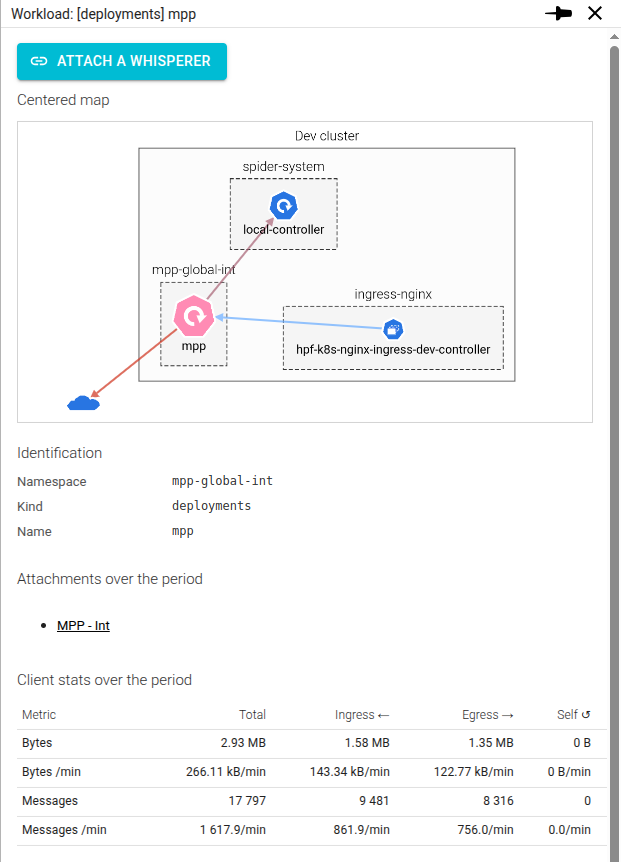
The Workload detailed view represent a Kubernetes workload and shows its interactions and usage statistics.
Access
You may open the workload details by clicking on a Workload in the Cluster Map.
Content
Screenshot
Actions
From the details panel, you may ask to attach a Whisperer to this workload.
The Attachment form will be displayed, prefilled to match this Controller and Workload, letting you the possibility to
choose the Whisperer.
Map
The map is centered on the workload and shows the various workload it interacts with.
It offers the same features as the cluster map.
Identification
| Field | Description |
|---|---|
| Namespace | Kubernetes namespace of the workload |
| Kind | Kind of workload (POD, Deployment...) |
| Name | The name as given by the K8s |
Attachments
Lists the Whisperers that have been attached to this workload in the selected period.
Clients stats
It shows, for all protocol, some statistics on bytes and messages exchanged during the selected time. It gives raw count and load (speed/min).
| Column | Description |
|---|---|
| Total | In + Out |
| Ingress | Payload received |
| Egress | Payload sent |
| Self | Payload sent to itself |
Port XXX usage
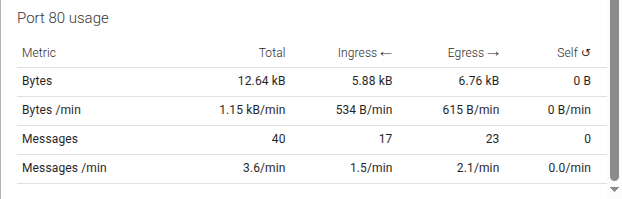
The same statistics as for global section reported on each server port of the workload.
When many ports are used, a section 'Server stats' show the statistics sum for all ports.