Redis communications
Concept
A Redis communication is a command / reply exchange between a Redis client and a Redis server, decoded from the RESP protocol (RESP2 and RESP3).
It is a sequence of related TCP packets in a TCP session between a client and a server.
Each Redis communication is associated with:
- Source and destination IP address
- Source and destination TCP port
- The connection information (user, database, RESP protocol version…) extracted from
AUTH/SELECT/HELLO/CLIENT SETNAME - The command issued, its key and arguments
- The kind of exchange:
simple- a single command and its replypipelined- commands sent back-to-back before their replies, each paired to its own replypush- a pub/sub delivery (message/pmessage/smessage), with no client requestmulti/multi-aborted- a command queued inside aMULTI/EXECtransaction (or a discarded / aborted one)
- The reply, with its RESP reply type, status, error and values
- The value(s) carried by the command and the reply, optionally transcoded to JSON via a schema
Redis communications are extracted while parsing the TCP sessions in streaming, on the Spider backend.
Global Tab
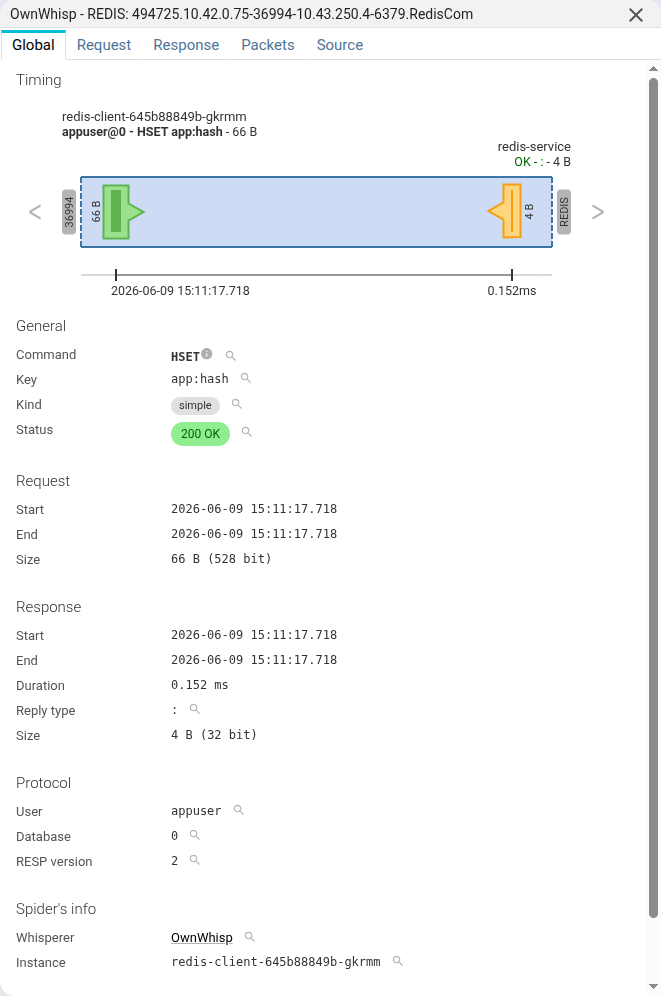
Timing
The timing diagram shows much information at a glance:
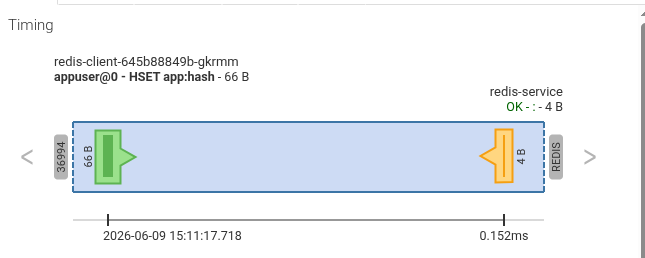
It shows the client and server hosts, the request (green) and response (orange) shapes scaled by the packet
timestamps with per-packet markers, the identity line (user@db - command key - size), and the response summary
(status + reply type + size). The Redis server port (6379 by default) is labelled REDIS.
- The client and server hosts are shown, by order of preference:
- The short name of the Host, as extracted during integration in the backend, or as renamed by a user
- The FQDN of the Host
- The IP address, if no Host found
General
The General section shows identification information:
| Field | Description |
|---|---|
| Command | The Redis command issued (e.g. GET, SET, HSET, SUBSCRIBE) |
| Key | The key the command operates on, when it has one |
| Kind | simple, pipelined, push, multi or multi-aborted |
| Status | A computed status, made to match HTTP semantics |
Spider maps RESP replies onto HTTP-like status codes so Redis communications are comparable with HTTP and PostgreSQL
ones (e.g. 200 OK, 400 for a -ERR, 401 / 403 for NOAUTH / WRONGPASS / no-permission errors,
404 when a key is missing, 409 for an aborted transaction).
Request
The Request section shows summary information of the request part:
| Field | Description |
|---|---|
| Start | Date the request started, user's local time |
| End | Date the request ended |
| Size | Total bytes sent to the server |
Response
The Response section shows summary information of the response part:
| Field | Description |
|---|---|
| Start | Date the response started |
| End | Date the response ended |
| Duration | The difference between request start and response end |
| Reply type | The RESP reply type (+ simple string, $ bulk string, : integer, * array, - error, _ null, …) |
| Size | Total bytes received from the server |
Protocol
The Protocol section shows the connection identity, extracted from the AUTH, SELECT, HELLO and
CLIENT SETNAME commands seen in the session and carried over to every communication in that session:
| Field | Description |
|---|---|
| User | The user used to connect to Redis (default if none) |
| Database | Redis logical database the client SELECTed (0 by default) |
| RESP version | Redis wire protocol version (2 or 3) |
The request Template (a stable name for recurrent commands, e.g. GET user:*) and any extracted Tags are
configured at Whisperer level and
are searchable. See Templates.
Tags
Tags are a very powerful feature of Spider parsing process.
They are configured at Whisperer level, and allow custom extraction of the data exchanged. They allow searching and aggregating by the extracted values.
Spider parses Redis commands and replies during processing, then links commands and replies together. Tags may be set - using regular expressions - to extract any value found in the command, its key, its arguments, or in the reply (its value, reply type or error).
Tags may be enriched / decoded by a plugin.
For instance:
- To translate internal identifiers from keys into their business names
- With a link to open them in the application under observation
Transaction
When the communication is part of a MULTI / EXEC transaction, a Transaction line links all the commands of the
same transaction together through a shared transactionId, so you can follow a whole transaction at once - including
its outcome (committed, DISCARDed, or aborted on EXECABORT / a dirty WATCH).
Spider info
This section shows Spider own information:
| Field | Description |
|---|---|
| Whisperer | Name and link to the Whisperer |
| Instance | Instance of the Whisperer that captured the communication |
| Tcp session | Tcp session id and link |
| Request parsing | Parsing status of the request |
| Response parsing | Parsing status of the response |
Actions
When packets are saved and available, you may download a .pcap file with this communication only.
Request tab
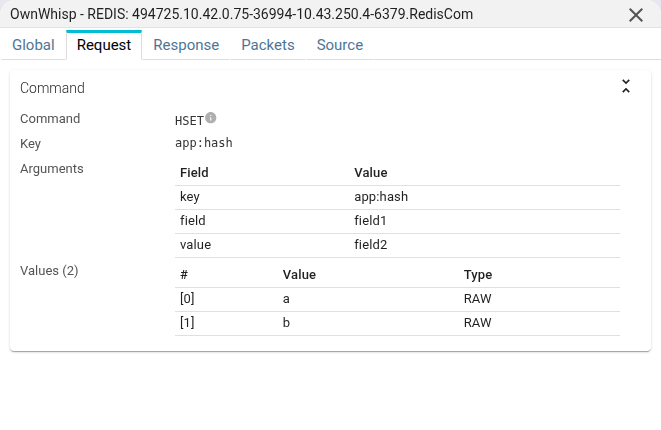
The Request tab shows the command sent by the client to the server: the command name, its key and its arguments.
When the command carries one or more values (e.g. SET, MSET, HSET), they are shown in an indexed value table -
one row per value. A toggle switches between the raw bytes and the transcoded JSON form when a
schema binding matches.
Response tab
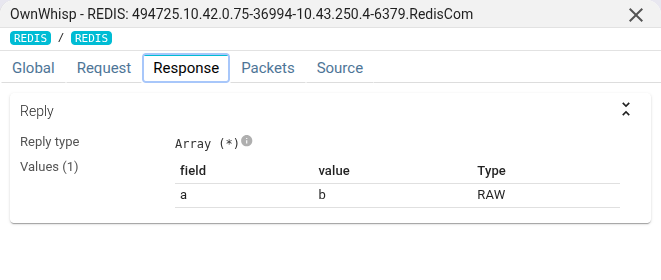
The Response tab shows the reply sent by the server, with its RESP reply type.
Multi-value replies (MGET, HGETALL, LRANGE, SMEMBERS…) are shown in the same indexed value table - one row per
returned value - with the same raw ↔ transcoded toggle. Large value sets are paged.
Transcoded view
When a content schema is bound to a (database, key glob)
pair, Spider transcodes the matching command and reply values from their binary form (Protobuf / MessagePack) to
searchable JSON. The value table then defaults to the Transcoded view, and falls back to Raw with a banner when
the binding misses or decoding fails. Tags and templates can extract from the JSON form of transcoded values.
Packets tab
The Packets tab shows the network packets composing the Redis communication.
You may open them by clicking on the rows.
| Field | Description |
|---|---|
| Dir | Direction of the packet |
| Time | Time the packet was captured |
| Payload | Size of the TCP payload |
| Info | Flags and beginning of TCP payload, in ASCII |
::: note When the communication is over TLS, the packets are encrypted. The only ways to see them decrypted is to access the TCP session, and:
- to read the packets from the beginning, in the
contenttab, - or to export the session in
.pcapngformat (for Wireshark or alike) :::
Source
The Source tab shows the Redis communication in JSON format.
Below is a sample Redis communication as it is available through the API:
{
    "@id": "oWl09MaiTVOz6Kuk7H9eOg.redis-84c8f95fd6-v8pgr.494744.10.42.0.67-38186-10.42.0.53-6379.554123633.RedisCom.6",
    "@type": "RedisCom",
    "dateModified": "2026-06-10T08:51:35.289+00:00",
    "tcpSession": "oWl09MaiTVOz6Kuk7H9eOg.redis-84c8f95fd6-v8pgr.494744.10.42.0.67-38186-10.42.0.53-6379.554123633",
    "instanceId": "redis-84c8f95fd6-v8pgr",
    "name": "494744.10.42.0.67-38186-10.42.0.53-6379.RedisCom",
    "whisperer": "oWl09MaiTVOz6Kuk7H9eOg",
    "kind": "simple",
    "req": {
        "command": "GET",
        "key": "app:counter",
        "template": "-",
        "args": [
            "GET",
            "app:counter"
        ],
        "argCount": 2,
        "size": 31,
        "packets": [
            "oWl09MaiTVOz6Kuk7H9eOg.redis-84c8f95fd6-v8pgr.494744.10.42.0.67-38186-10.42.0.53-6379.554123633-13"
        ],
        "start": 1781081483.696741,
        "startDate": "2026-06-10T08:51:23.696Z",
        "end": 1781081483.696741,
        "endDate": "2026-06-10T08:51:23.696Z",
        "startMinute": "2026-06-10T08:51:00Z",
        "status": "COMPLETE"
    },
    "res": {
        "replyType": "$",
        "size": 8,
        "packets": [
            "oWl09MaiTVOz6Kuk7H9eOg.redis-84c8f95fd6-v8pgr.494744.10.42.0.67-38186-10.42.0.53-6379.554123633-14"
        ],
        "start": 1781081483.696792,
        "startDate": "2026-06-10T08:51:23.696Z",
        "end": 1781081483.696792,
        "endDate": "2026-06-10T08:51:23.696Z",
        "status": "COMPLETE"
    },
    "stats": {
        "statusCode": 200,
        "statusText": "OK",
        "duration": 0.00005078315734863281,
        "respVersion": 2,
        "dst": {
            "ip": "10.42.0.53",
            "name": "redis-84c8f95fd6-v8pgr",
            "port": 6379,
            "socket": "10.42.0.53:6379"
        },
        "src": {
            "ip": "10.42.0.67",
            "name": "redis-client-645b88849b-gkrmm.test-redis-notls.pod.cluster.local.",
            "port": 38186,
            "socket": "10.42.0.67:38186"
        },
        "timespan": {
            "gte": "2026-06-10T08:51:23.696Z",
            "lte": "2026-06-10T08:51:23.696Z"
        },
        "tags": {
            "values": {},
            "count": {},
            "cardinality": {}
        }
    },
    "connectionMetadata": {
        "user": "appuser",
        "db": "0"
    },
    "redisParsing": "oWl09MaiTVOz6Kuk7H9eOg.redis-84c8f95fd6-v8pgr.494744.10.42.0.67-38186-10.42.0.53-6379.554123633.RedisParsingLog"
}
Most fields are self-explanatory. Most fields are indexed and searchable.
Some extra explanation:
| Field | Description |
|---|---|
| connectionMetadata | Data extracted at connection time, and copied to all communications inside the session |
| kind | simple, pipelined, push, multi or multi-aborted |
| req.template | Computed command name (see Templates) - "-" when none matches |
| res.replyType | The RESP reply type byte (+ $ : * - _ # , ( ~ % > …) |
| stats | Stats object regroup most important information |
| stats.timespan | Indexed as range, to allow range searching and aggregations |
| stats.src|dst.name | Hostname resolved on the Whisperer |
| stats.tags.* | Extracted tags values, count and cardinality |
| req\res.status | Parsing status |
| transactionId | Present on multi / multi-aborted coms - groups a MULTI / EXEC transaction |
The full request and response values are stored separately (in a dedicated content store) and fetched on demand from the Request / Response tabs, so the communication document itself stays small and fast to search.