MQTT communications
Concept
An MQTT communication is one MQTT exchange between a client and its broker, decoded from the TCP frames of their connection: a message published with its acknowledgement, a message delivered by the broker to a subscriber, a connection, a subscription or a disconnection.
MQTT 3.1, 3.1.1 and 5.0 are decoded, over plain TCP (port 1883 by convention) or over TLS (port 8883), decrypted
with the master secrets captured by Gocipher, as for HTTPS, PostgreSQL, Redis, gRPC, Kafka and MySQL.
Each MQTT communication is associated with:
- Source and destination IP address, TCP port and Kubernetes workload - the source is always the MQTT client, the destination the broker
- The exchange:
PUBLISH,CONNECT,SUBSCRIBE,UNSUBSCRIBEorDISCONNECT, and its direction - For a message: the topic, its template, the QoS, the retain and dup flags, the packet id, the payload size and hash, and the MQTT 5 properties
- For a subscription: the topic filters, with the requested and granted QoS
- The acknowledgement: packet type, reason code, and every step of a QoS 1 or 2 handshake
- The connection: client id, user name, protocol version, keepalive, clean start and will
MQTT communications are extracted while parsing the TCP sessions in streaming, on the Spider backend.
With MQTT, a publisher sends its message to the broker, and the broker sends it again to each subscriber, on other connections. Spider sees each leg separately: one communication for the publish, one per delivery. The Topic Map puts the legs back together, by topic.
One com per exchange
| Exchange | Direction | Request (req, sent by the client) | Response (res, sent by the broker) |
|---|---|---|---|
| Client publishes | client → broker | PUBLISH, with the payload | PUBACK, or PUBREC ... PUBCOMP (QoS 2) |
| Broker delivers | broker → client | the identity of the message, and the client's ack | PUBLISH, with the payload |
| Connection | client → broker | CONNECT | CONNACK |
| Subscription | client → broker | SUBSCRIBE or UNSUBSCRIBE | SUBACK or UNSUBACK |
| Client disconnection | client → broker | DISCONNECT | none |
| Broker disconnection | broker → client | - | DISCONNECT (MQTT 5) |
A delivery has direction: res. Its topic, QoS and packet id stay on req, like for a publish, but its payload is on
res: the side that carried it.
PINGREQ and PINGRESP keepalives are not saved.
Spider must see the CONNECT of a connection to decode it: MQTT 3.1.1 and MQTT 5 messages have different layouts, and
the version is only given there. A connection opened before the Whisperer was attached is skipped, never guessed.
Restart the client after attaching the Whisperer, or attach first.
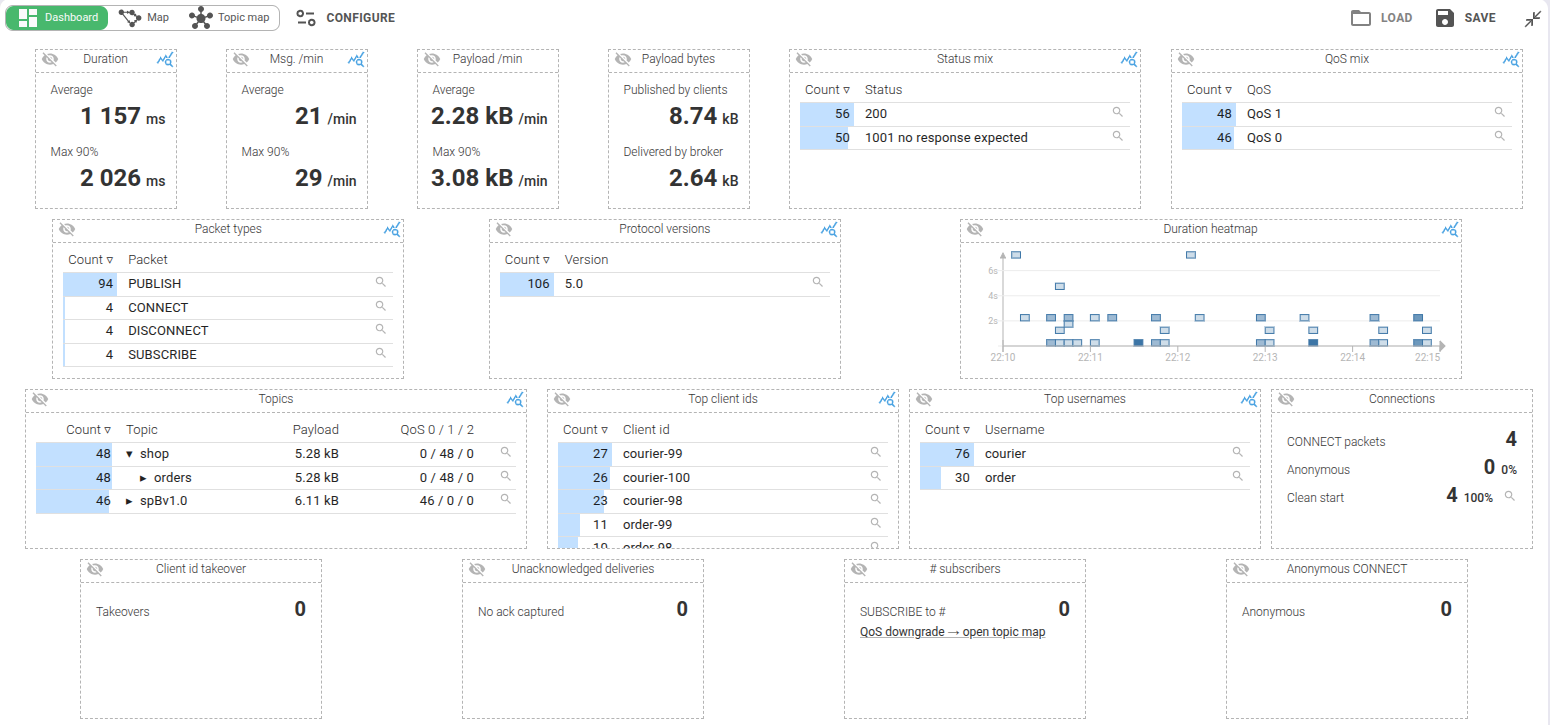
MQTT communications appear in the dedicated MQTT view - grid, timeline, dashboard, sequence diagram, waterfall, map, topic map, statistics and diff - and in the unified All view. The MQTT view opens on its Dashboard.
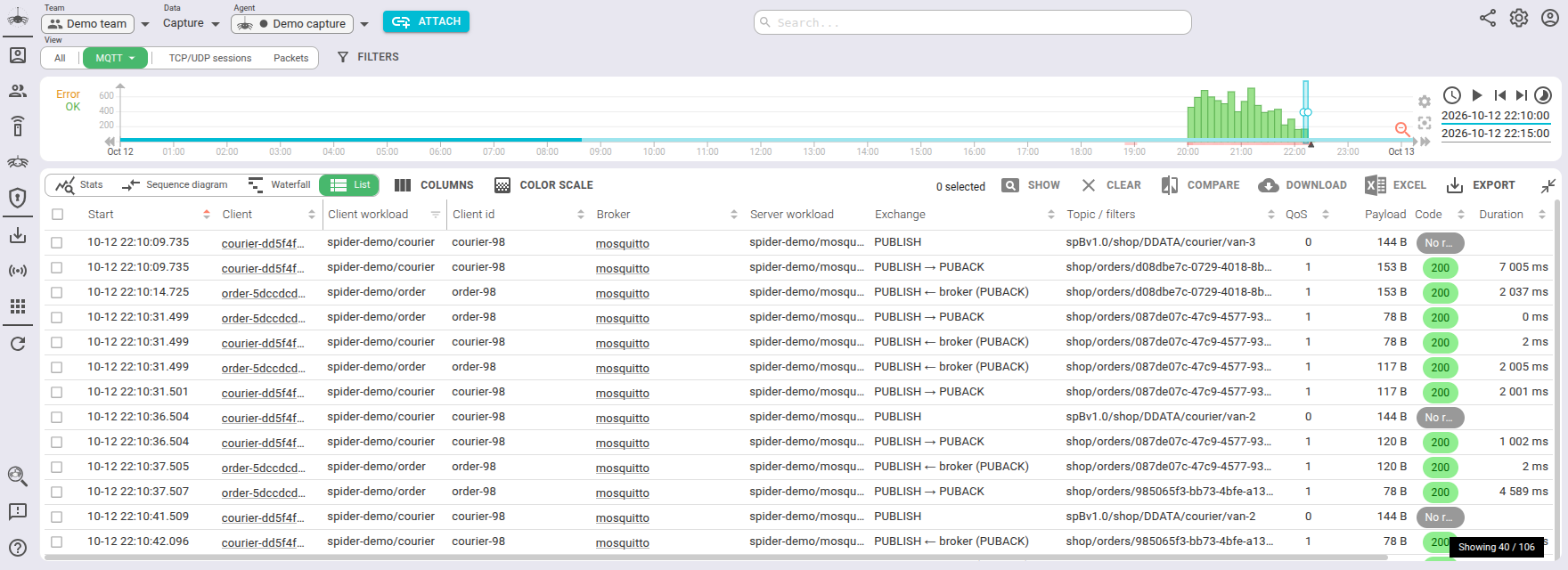
Global Tab
The Global tab summarises the exchange.
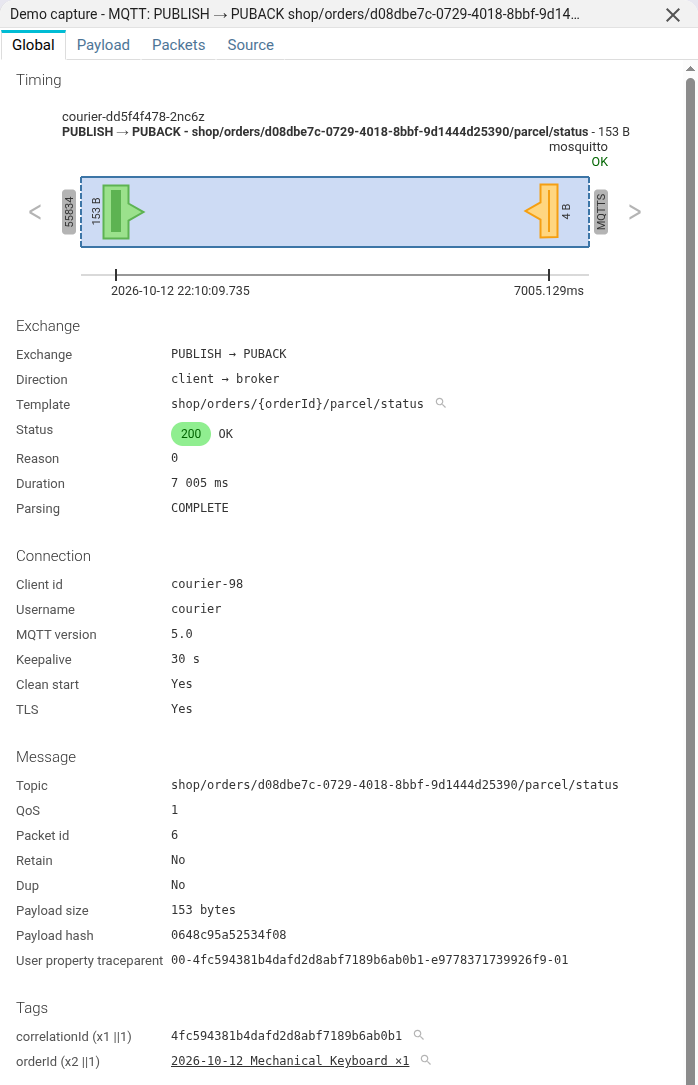
Timing
The timing diagram shows the client and the broker, and each packet of the exchange on the capture timeline.
Exchange
| Field | Description |
|---|---|
| Exchange | The packets of the exchange, as PUBLISH → PUBACK |
| Direction | client → broker, or broker → client for a delivery |
| Template | Stable name of the topic, see Templates. Click to filter. |
| Status | The computed status, see Statuses |
| Reason | The reason code of the broker's acknowledgement, with its reason string when there is one |
| Duration | The difference between request start and response end |
Connection
| Field | Description |
|---|---|
| Client id | The client id given in the CONNECT |
| Username | The user name of the connection, when there is one |
| Password | On a CONNECT, only when the Whisperer saves it and you have payload access. Masked, with a Reveal button. |
| MQTT version | 3.1, 3.1.1 or 5.0 |
| Keepalive | The keepalive declared by the client |
| Clean start | Whether the client asked for a new session |
| Will topic | The topic of the last will, when the client declared one |
| TLS | Whether the connection was encrypted |
| Session present | On a CONNECT, whether the broker kept a session for this client |
The connection fields are copied on every communication of the connection, so you can search a message by its
client id or user name, although a PUBLISH carries neither.
Message
For a PUBLISH:
| Field | Description |
|---|---|
| Topic | The topic, with MQTT 5 topic aliases resolved |
| Topic alias | The MQTT 5 topic alias, when one was used |
| QoS | 0, 1 or 2 |
| Packet id | The packet id of a QoS 1 or 2 message |
| Retain, Dup | The flags of the message |
| Payload size | Size of the payload. When it was truncated, its original size |
| Payload hash | A short hash of the payload, computed even when the payload is not saved |
| Content type, Payload format, Response topic, Correlation data, Message expiry | MQTT 5 properties |
| User property | One line per MQTT 5 user property. Values are only shown to users with payload access. |
Tags
Tags are configured at Whisperer level, and
extract values from the topic, the MQTT 5 user properties and the decoded payload.
They allow searching and aggregating by the extracted values, and correlating MQTT messages with the rest of Spider's data:
a traceparent user property links a message to the HTTP, gRPC and Kafka exchanges of the same request.
Delivery ack
For a delivery, the acknowledgement sent back by the subscriber: packet type, time and reason. A QoS 1 or 2 delivery whose acknowledgement was not captured says No ack captured.
Subscription
For a SUBSCRIBE or an UNSUBSCRIBE, one line per topic filter, with its shared subscription group, the requested QoS
and the QoS granted by the broker. A filter granted a lower QoS than requested is flagged QoS downgraded.
Spider info
| Field | Description |
|---|---|
| Whisperer | Name and link to the Whisperer |
| Payload side | req for a client publish, res for a delivery |
| Parsing log | Id of the parsing log, when the Whisperer saves it |
| TCP session | Tcp session id and link |
| Previous / Next com | The communications before and after this one on the same connection |
Payload tab
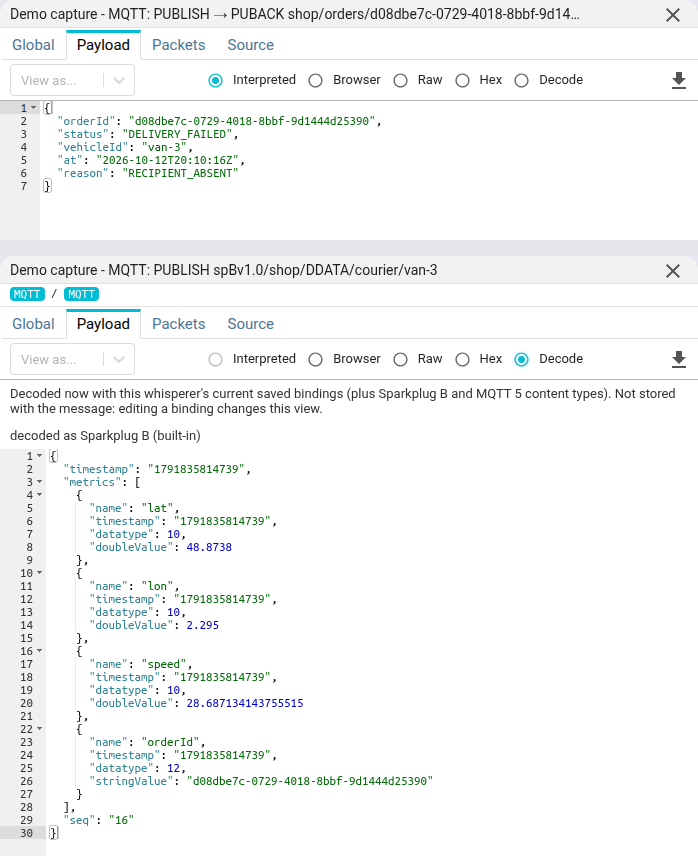
The Payload tab shows the payload of a PUBLISH, with the same views as an HTTP body: interpreted, browser, raw, and
a Hex dump. The default view follows the MQTT 5 content type and payload format when the message has them.
The Transcoded view decodes a binary payload into JSON, as for HTTP, gRPC, Redis and Kafka payloads:
- Sparkplug B payloads, recognised from their
spBv1.0/...topic; - MQTT 5 payloads declaring a JSON, CBOR or MessagePack content type;
- any payload matching a content schema of the Whisperer: Protobuf, Avro, CBOR, MessagePack or JSON.
It is the default view when one of these matches the payload. The decoding is done by the mqtt-read service with
the Whisperer's current content schemas: it is not stored with the message, so editing a binding changes this view.
It requires a licence with transcoding.
The payload is stored in a content document, separately from the communication, up to the Whisperer's
Max payload bytes (64 KiB by default). It is not available when:
- the topic is metadata only, or the Whisperer does not save payloads;
- your access to the Whisperer forbids payloads.
A truncated payload says so, and is not decoded: a prefix of a binary message proves nothing. The download button saves the payload as a file.
Packets tab
The Packets tab shows the network packets composing the communication.
You may open them by clicking on the rows.
When MQTT uses TLS, the packets are encrypted.
To see them decrypted, open the TCP session and read its content tab, or export the session in .pcapng format
(for Wireshark or alike).
Source
The Source tab shows the MQTT communication in JSON format, as available through the API. A CONNECT password is
replaced, since this tab is routinely copied into tickets.
Below is a QoS 1 publish of an MQTT 5 client, over TLS:
{
    "@id": "aqsilMQtTbSvp4WPNgJfyg.courier-5dccc488d8-lzlxg.497729.10.42.0.86-39328-10.43.12.244-8883.3214906360.MqttCom.3.fef8a17feefa",
    "@type": "MqttCom",
    "kind": "mqtt",
    "status": "COMPLETE",
    "whisperer": "aqsilMQtTbSvp4WPNgJfyg",
    "instanceId": "courier-5dccc488d8-lzlxg",
    "tcpSession": "aqsilMQtTbSvp4WPNgJfyg.courier-5dccc488d8-lzlxg.497729.10.42.0.86-39328-10.43.12.244-8883.3214906360",
    "conn": {
        "clientId": "courier-84",
        "username": "courier",
        "protocolVersion": 5,
        "keepalive": 30,
        "cleanStart": true,
        "hasWill": false
    },
    "req": {
        "packetType": "PUBLISH",
        "topic": "shop/orders/57c7eff7-32af-4b19-a829-6f1e387187fe/parcel/status",
        "template": "shop/orders/{orderId}/parcel/status",
        "qos": 1,
        "retain": false,
        "dup": false,
        "packetId": 3,
        "size": 117,
        "payloadHash": "d0babe7e6b00b410",
        "userProperties": {"traceparent": "00-8ff86dce88d8a57d67295cc03e2f9ba3-c9ea4a0043319fea-01"},
        "userPropertyNames": ["traceparent"],
        "startDate": "2026-10-12T17:14:40.207173109Z",
        "endDate": "2026-10-12T17:14:40.207173109Z"
    },
    "res": {
        "packetType": "PUBACK",
        "packetId": 3,
        "reasonCode": 0,
        "size": 4,
        "startDate": "2026-10-12T17:14:40.207828999Z",
        "endDate": "2026-10-12T17:14:40.207828999Z"
    },
    "stats": {
        "withTls": true,
        "statusCode": 200,
        "statusText": "OK",
        "duration": 0.000656,
        "steps": [
            {"from": "client", "packetType": "PUBLISH", "time": 1791825280.207173},
            {"from": "broker", "packetType": "PUBACK", "reasonCode": 0, "time": 1791825280.207829}
        ],
        "tags": {
            "values": {"correlationId": ["8ff86dce88d8a57d67295cc03e2f9ba3"], "orderId": ["57c7eff7-32af-4b19-a829-6f1e387187fe"]},
            "count": {"correlationId": 1, "orderId": 2},
            "cardinality": {"correlationId": 1, "orderId": 1}
        },
        "timespan": {"gte": "2026-10-12T17:14:40.207173109Z", "lte": "2026-10-12T17:14:40.207828999Z"}
    },
    "mqttParsing": "aqsilMQtTbSvp4WPNgJfyg.courier-5dccc488d8-lzlxg.497729.10.42.0.86-39328-10.43.12.244-8883.3214906360.MqttParsingLog"
}
This sample is abridged. Most fields are indexed and searchable.
Some extra explanation:
| Field | Description |
|---|---|
| kind | Always mqtt. It tells MQTT communications apart in the unified view |
| direction | Absent for an exchange initiated by the client, res for one initiated by the broker (delivery, MQTT 5 DISCONNECT) |
| conn.* | The connection metadata, copied on every communication of the connection |
| req.packetType | CONNECT, PUBLISH, SUBSCRIBE, UNSUBSCRIBE or DISCONNECT |
| req.topic | The topic of a PUBLISH, aliases resolved |
| req.template | Computed name of the topic, see Templates |
| req.topicFilters | On a SUBSCRIBE or UNSUBSCRIBE: filter, shareGroup, requestedQos, grantedQos |
req.userProperties.<name> | MQTT 5 user properties, searchable as req.userProperties.traceparent:... (on res for a delivery) |
| req.ackPacketType | On a delivery, the acknowledgement sent by the subscriber |
| res.reasonCode | Reason code of the broker's acknowledgement (or the CONNACK return code in MQTT 3.1.1) |
| res.grantedQos | On a SUBACK, the QoS granted for each filter |
| stats.steps | Every packet of a QoS 1 or 2 handshake, in wire order, with its time and reason code. Display only, not searchable. |
| stats.statusCode | See Statuses |
| stats.tags.* | Extracted tag values, count and cardinality |
| mqttParsing | Id of the parsing log document for this communication |
The payload is on the side that carried it: req for a client publish, res for a delivery. So req.size is 0 on a
delivery: search the size of delivered messages on res.size.
The payload bytes themselves are stored in a separate MqttComContent store, and fetched on demand by the Payload tab.
Sequence diagram: the QoS flow
In the MQTT view, the sequence diagram draws each QoS 1 or 2 message with every packet of its handshake:
PUBLISH then PUBACK, or PUBLISH, PUBREC, PUBREL and PUBCOMP for QoS 2, from the client to the broker or
the other way round. A non-zero reason code is shown on the step that carried it, and the last step carries the status
when it is not OK. Steps that were never captured are missing, so you see how far a handshake went.
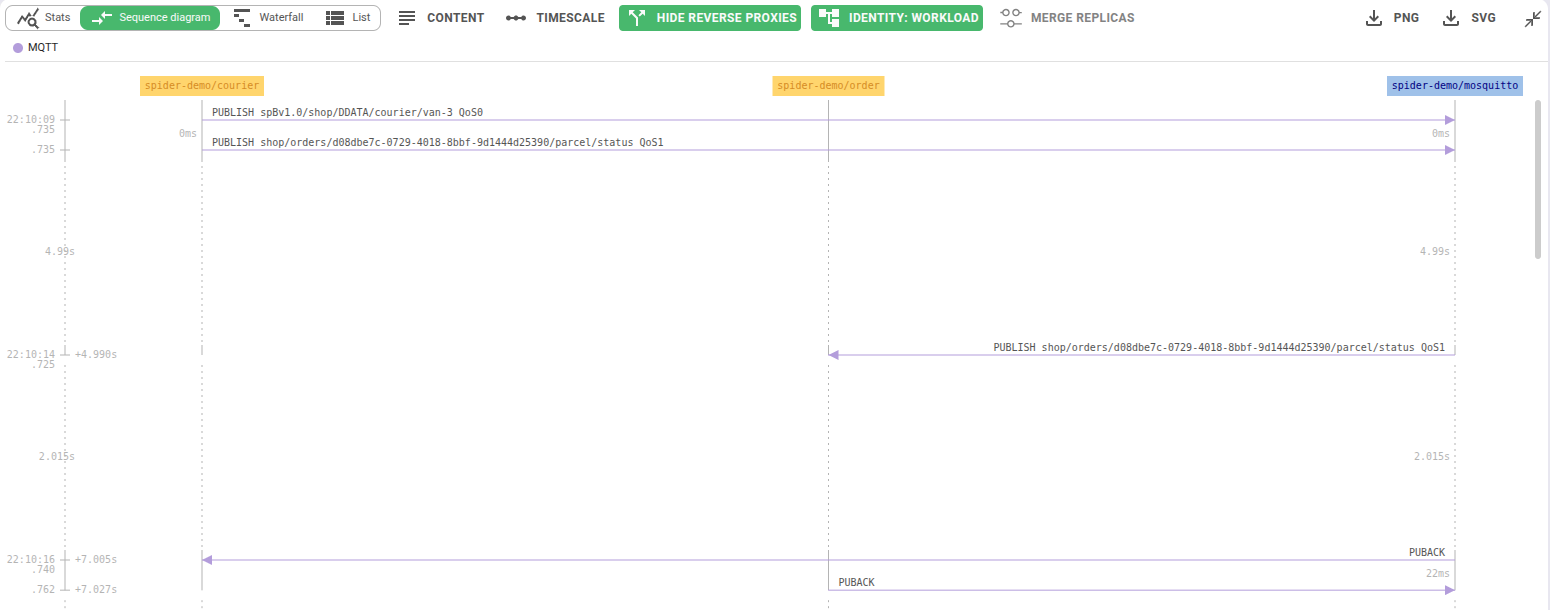
Above, the courier publishes a QoS 0 Sparkplug B message, with no acknowledgement, and a QoS 1 parcel status. The broker
delivers the status to the order service, and each leg ends with its own PUBACK.
Topic filter
The Topic filter (MQTT wildcards) filter of the Message filters menu takes an MQTT topic filter, such as
sensors/+/temp or factory/#, and keeps the messages whose topic matches it, with the MQTT rules: + matches one
level, # all the levels below, and a wildcard at the first level does not match a $ topic.
Dashboard
The MQTT view opens on its dashboard:
- Global: volume over time, statuses, QoS, packet types and protocol versions.
- Topics: a collapsible topic tree, built from the 1000 busiest topics, with the count, bytes and QoS mix of each branch. Click a node to filter the view on that subtree.
- Clients: top client ids and user names, share of anonymous and clean start connections.
- Anomalies: client id takeovers (MQTT 5
DISCONNECTwith reason0x8E), deliveries never acknowledged,#subscribers, anonymousCONNECT, and aQoS downgrade → open topic maplink. Each widget filters the view on click.
Topic Map
The Topic Map mode shows who publishes to which topic and who receives it, with the problems flagged: QoS downgrades, refused or silent subscriptions, orphan topics, errors and missing acknowledgements.
Templates
The req.template gives a stable name to a family of topics, so you can aggregate them. It is computed as follows:
- The first topic template rule whose pattern matches the topic.
- Otherwise the normalised topic: numeric levels, UUIDs, long hexadecimal levels and runs of 4 digits or more are
replaced by
?.plant/7/tempandplant/8/tempare then the same template,plant/?/temp. - For a packet other than
PUBLISH, its type:CONNECT,SUBSCRIBE...
Statuses
Like the other protocols, an MQTT communication gets an HTTP-like status:
| Status | Meaning |
|---|---|
200 OK | The exchange succeeded. A QoS 0 delivery is 200 too. |
1001 No response expected | A QoS 0 publish, or a client DISCONNECT: nothing comes back by design. Complete, never an error. |
1000 No response | A QoS 1 or 2 message whose acknowledgement was never captured. |
500 Incomplete | An acknowledgement started but was cut off, such as a QoS 2 handshake that stopped half-way. |
400, 401, 403, 429, 503, 500 | The broker refused: see below. |
The reason codes of CONNACK, SUBACK, PUBACK and the other acknowledgements are mapped to statuses:
| Reason | Status |
|---|---|
| Malformed packet, protocol error, invalid client id, topic or filter | 400 |
| Bad user name or password, bad authentication method | 401 |
| Not authorized, banned | 403 |
| Message rate too high, quota exceeded | 429 |
| Server unavailable, server busy | 503 |
| Any other failure | 500 |
In MQTT 3.1.1, the CONNACK return codes 3, 4 and 5 give 503, 401 and 403, and a refused SUBACK filter 500.
The raw reason code is kept on the communication.
Retention and purge
MQTT communications follow the same Data Storage Policies as the other protocols. They can be removed from Spider with the purge tool, which deletes a communication together with its payload.
Export and re-import
MQTT searches can be exported to CSV: one row per communication, and one row per topic filter for a
SUBSCRIBE or UNSUBSCRIBE. The payload column is only filled for users with payload access; passwords are never exported.
MQTT communications downloaded as JSON can be uploaded again into an upload Whisperer.
Access from the CLI and AI agents
MQTT communications and the topic map are available in the spider CLI (spider search|stats|aggs|outliers mqtt, spider topic-map mqtt)
and in the MCP server (type: mqtt, spider_topic_map).