MySQL communications
Concept
A MySQL communication is a single MySQL command and its response, decoded from the TCP frames of a client/server
session. Like PostgreSQL, it pairs one client command with the server answer: an OK, an ERR or a result set.
Each MySQL communication is associated with:
- Source and destination IP address
- Source and destination TCP port
- The command: the SQL verb (
SELECT,INSERT...) and the wire command it travelled in (COM_QUERY,COM_STMT_EXECUTE...) - The SQL text, the tables it touches, and its query analysis
- The bound parameters, for prepared statements
- The result: row count, number of result sets, rows, or the error (code, SQLSTATE, message)
- The connection metadata: user, database and server version, read from the handshake
MySQL communications are extracted while parsing the TCP sessions in streaming, on the Spider backend. MySQL over TLS is decrypted with the master secrets captured by Gocipher, in the same way as for HTTPS, PostgreSQL, Redis, gRPC and Kafka.
MySQL packets carry no message type: a parser must remember what was sent to know how to read what comes back.
Spider follows each connection through the handshake and the command phase, in text (COM_QUERY) and binary
(prepared statements) protocols, and through result sets chained by a CALL.
The handshake itself is not a communication: its content is only used to fill the connection metadata,
and the authentication data is never decoded nor stored.
One com per command
COM_QUERYis one communication.- A prepared statement is one communication per
COM_STMT_PREPARE, and one perCOM_STMT_EXECUTE. The execution gets the SQL text of the statement prepared earlier on the same connection. COM_STMT_CLOSE,COM_STMT_RESET,COM_STMT_SEND_LONG_DATA,COM_INIT_DB(USE),COM_PING,COM_CHANGE_USERandCOM_QUIT(TERMINATE) are communications too.
A communication has a kind:
| Kind | Commands |
|---|---|
simple | COM_QUERY |
extended | COM_STMT_PREPARE, COM_STMT_EXECUTE, COM_STMT_CLOSE, COM_STMT_SEND_LONG_DATA, COM_STMT_RESET |
termination | COM_QUIT |
misc | Any other command |
PREPAREAn execution whose PREPARE was not captured (or happened before an idle split of the connection) has no SQL text.
It is shown as REBIND, flagged prepared before capture, SQL text unavailable, and has no query analysis.
MySQL communications appear in the dedicated MySQL view - grid, timeline, dashboard, sequence diagram, waterfall, map, statistics and diff - and in the unified All view.
Global Tab
The Global tab summarises the exchange: timing, identification, request, response, tags and Spider info.
Timing
The timing diagram shows the client and server hosts, the request (green) and response (orange) shapes scaled by
the packet timestamps, and the response summary. The MySQL server port (3306 by convention) is labelled.
- The client and server hosts are shown, by order of preference:
- The short name of the Host, as extracted during integration in the backend, or as renamed by a user
- The FQDN of the Host
- The IP address, if no Host found
General
| Field | Description |
|---|---|
| From | The client, with the MySQL user of the connection |
| To | The server, with the database and the server version |
| Client workload | Kubernetes workload of the client, when resolved - see Workload identity |
| Server workload | Kubernetes workload of the server, when resolved |
The user, database and server version come from the handshake, and follow COM_CHANGE_USER and COM_INIT_DB.
Request
| Field | Description |
|---|---|
| Template | Stable name of the statement, see Templates. Click to filter. |
| Date | Date the request started, user's local time |
| Request | The SQL verb and the tables it references. Click to filter by command or table. |
| Prepared | For an execution: COM_STMT_EXECUTE and the statement id |
| Size | Total bytes of the request |
Response
| Field | Description |
|---|---|
| Response status | The computed status: 200 Ok, 400 Error or 400 Incomplete, see Statuses |
| Duration | The difference between request start and response end |
| Row count | Total rows returned, over all result sets |
| Result sets | Number of result sets, when there is more than one |
| Error code | The MySQL error number, when the server answered with an error |
| SQL state | The 5 characters SQLSTATE of the error |
| Error | The error message |
| Size | Total bytes of the response |
Tags
Tags are a very powerful feature of Spider's parsing process.
They are configured at Whisperer level, and allow custom extraction of data from the statements and their results. They allow searching and aggregating by the extracted values, and correlating MySQL statements with the rest of Spider's data.
Tags may be enriched / decoded by a plugin.
Spider info
| Field | Description |
|---|---|
| Whisperer | Name and link to the Whisperer |
| Instance | Instance of the Whisperer that captured the communication |
| Tcp session | Tcp session id and link |
Request tab
The Request tab shows the statement:
- Command - the SQL verb, and the wire command it was sent with (
COM_QUERY,COM_STMT_PREPARE,COM_STMT_EXECUTE...). For prepared statements, the statement id. - Table(s) - the tables the statement references.
- SQL - the SQL text, highlighted.
- Parameters - the values bound to a prepared statement execution, with their encoding.
- Query analysis - see below.
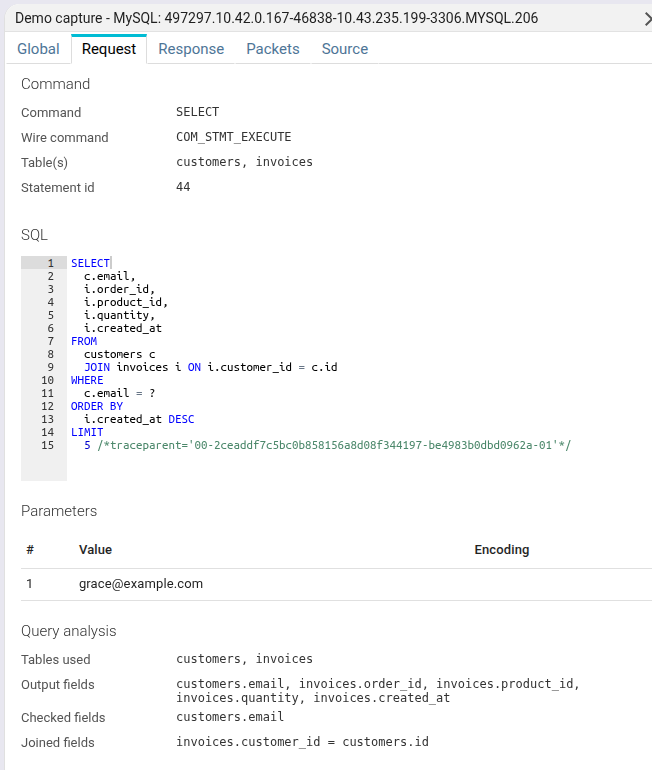
The SQL text is stored in the communication content, separately from the metadata, together with the parameters and the rows. When the content is not available (not saved, or restricted for your access), the tab says so instead of showing it.
Query analysis
Spider parses each statement and shows what it does, without you reading the SQL:
| Field | Description |
|---|---|
| Tables used | Every table the statement references |
| Output fields | The columns of a SELECT result, with their source table and column |
| Checked fields | The columns compared in WHERE conditions, with the compared value |
| Joined fields | The pairs of columns joined together |
| Inserted fields | The columns of an INSERT and their values |
| Updated fields | The columns set by an UPDATE |
| Conflict updated fields | The columns set by ON DUPLICATE KEY UPDATE |
| Deleted from | The table(s) a DELETE removes rows from |
For a prepared statement, a ? placeholder is resolved to the value bound at execution when it is used by
tags.
- Statements above 64 KiB are not analysed.
- Only comparisons and
LIKEmake checked fields. A scalar subquery in aWHEREcontributes its tables and checked fields. SELECT 1has one computed output field and no table.
Response tab
The Response tab shows:
- the Error (code, SQLSTATE, message), when the server answered with one;
- the Result: row count and number of result sets;
- the Rows of each result set, as a table, with the type of each column. A
CALLmay return several result sets.
Rows are decoded for both the text and the binary protocols. Values of binary and blob columns are shown base64 encoded.
The rows are saved (or not) according to the Whisperer content settings. When rows are dropped, because they are not saved or past the size limit, a notice says so.
Unlike Kafka, gRPC or Redis, MySQL values are self-described by the column definitions of the protocol. There is no schema binding nor transcoding for MySQL.
Packets tab
The Packets tab shows the network packets composing the communication.
You may open them by clicking on the rows.
| Field | Description |
|---|---|
| Dir | Direction of the packet |
| Time | Time the packet was captured |
| Payload | Size of the TCP payload |
| Info | Flags and beginning of TCP payload, in ASCII |
::: note When MySQL uses TLS, the packets are encrypted. The only ways to see them decrypted is to access the TCP session, and:
- to read the packets from the beginning, in the
contenttab, - or to export the session in
.pcapngformat (for Wireshark or alike) :::
Source
The Source tab shows the MySQL communication in JSON format, as available through the API.
Below is a sample prepared SELECT:
{
    "@id": "aQx7MnPqRsT9BuYvWoNa8c.mysql-client-7f8b9d-nx4vp.382941.10.42.0.167-46838-10.43.235.199-3306.712345678.MySqlCom.12",
    "@type": "MySqlCom",
    "dateModified": "2026-09-24T10:23:41.157+00:00",
    "tcpSession": "aQx7MnPqRsT9BuYvWoNa8c.mysql-client-7f8b9d-nx4vp.382941.10.42.0.167-46838-10.43.235.199-3306.712345678",
    "instanceId": "mysql-client-7f8b9d-nx4vp",
    "whisperer": "aQx7MnPqRsT9BuYvWoNa8c",
    "kind": "extended",
    "status": "COMPLETE",
    "connectionMetadata": {
        "user": "app",
        "database": "app_db",
        "server_version": "8.4.0"
    },
    "req": {
        "status": "COMPLETE",
        "command": "SELECT",
        "commandCode": 23,
        "commandName": "COM_STMT_EXECUTE",
        "statementId": 44,
        "prepared": true,
        "tables": ["customers", "invoices"],
        "template": "select `c`.`email` , ... from `customers` as `c` join `invoices` as `i` on ... where `c`.`email` = ? order by ... limit ?",
        "queryAnalysis": {
            "tablesUsed": ["customers", "invoices"],
            "checkedFields": [{"path": "customers.email", "paramIndex": 1}],
            "joinedFields": [{"leftPath": "invoices.customer_id", "rightPath": "customers.id"}]
        },
        "size": 61,
        "startDate": "2026-09-24T10:23:41.089Z",
        "endDate": "2026-09-24T10:23:41.089Z"
    },
    "res": {
        "status": "COMPLETE",
        "rowCount": 5,
        "resultsCount": 1,
        "resultSets": [{"columnNames": ["email", "order_id", "product_id", "quantity", "created_at"], "rowCount": 5}],
        "size": 512,
        "startDate": "2026-09-24T10:23:41.093Z",
        "endDate": "2026-09-24T10:23:41.094Z"
    },
    "stats": {
        "withTls": true,
        "statusCode": 200,
        "statusText": "Ok",
        "duration": 0.004,
        "timespan": {"gte": "2026-09-24T10:23:41.089Z", "lte": "2026-09-24T10:23:41.094Z"},
        "tags": {"values": {}, "count": {}, "cardinality": {}}
    },
    "mysqlParsing": "aQx7MnPqRsT9BuYvWoNa8c.mysql-client-7f8b9d-nx4vp.382941.10.42.0.167-46838-10.43.235.199-3306.712345678.MySqlParsingLog"
}
This sample is abridged. Most fields are indexed and searchable.
Some extra explanation:
| Field | Description |
|---|---|
| kind | simple, extended, termination or misc, see above |
| connectionMetadata | user, database and server_version of the connection when the communication was emitted |
| req.command | The SQL verb, as a keyword (SELECT, INSERT, UPDATE, DELETE...), or TERMINATE, PING, USE, STMT_CLOSE... |
| req.commandCode | The numeric MySQL wire command |
| req.commandName | The wire command name (COM_QUERY, COM_STMT_EXECUTE...) |
| req.tables | Tables referenced by the statement. Also searched by the quick search. |
| req.prepared | true for a COM_STMT_EXECUTE |
| req.statementUnresolved | true when the prepared statement's PREPARE was not seen |
| req.template | Computed name of the statement, see Templates |
| req.queryAnalysis | The analysis of the statement |
| res.rowCount | Total number of rows returned |
| res.resultsCount | Number of result sets |
| res.errorCode | MySQL error number. Absent when the command succeeded. |
| res.sqlState | SQLSTATE of the error |
| res.errorMessage | Error message |
| stats.withTls | true when the exchange was carried over TLS |
| stats.statusCode | 200 or 400, see Statuses |
| stats.timespan | Indexed as range, to allow range searching and aggregations |
| stats.tags.* | Extracted tag values, count and cardinality |
| mysqlParsing | Id of the parsing log document for this communication |
The SQL text, parameters and result rows are stored separately, in a dedicated per-communication MySqlComContent
store, and fetched on demand from the Request / Response tabs. The communication document itself stays small and
fast to search.
Templates
The req.template gives a stable name to a family of statements, so you can aggregate them. It is computed as follows:
- The first template rule whose pattern matches the SQL text.
- Otherwise the normalised SQL: literals replaced by
?,IN (...)andVALUES (...)lists collapsed, comments removed, keywords lower-cased.WHERE id = 42andWHERE id = 43are then the same template. - Otherwise, for a command with no SQL text (or an oversized statement), the command itself.
An execution of a prepared statement uses the SQL text of its PREPARE.
Statuses
Like the other protocols, a MySQL communication gets an HTTP-like status:
| Status | Meaning |
|---|---|
200 Ok | The command succeeded. Commands that expect no response are also 200. |
400 Error | The server answered with an error (res.errorCode is set). |
400 Incomplete | A response was expected and never captured. |
The MySQL error number, SQLSTATE and message are kept verbatim on the response.
Retention and purge
MySQL communications follow the same Data Storage Policies as the other protocols. They can be removed from Spider with the purge tool, which deletes a communication together with its content.
Access from the CLI and AI agents
MySQL communications are available in the spider CLI (spider search|stats|aggs|outliers mysql)
and in the MCP server (type: mysql).