MongoDB communications
Concept
A MongoDB communication is a single MongoDB command and its reply, decoded from the TCP frames of a client/server
connection. Spider reads the MongoDB wire protocol: OP_MSG, compressed messages (OP_COMPRESSED with snappy, zlib or zstd)
and the legacy OP_QUERY / OP_REPLY still used by some drivers for the handshake.
Each MongoDB communication is associated with:
- Source and destination IP address and TCP port
- The command (
find,insert,aggregate,getMore...), its database and its collection - The query shape: the command with every value replaced by
?, see Templates - The command document, with write payloads redacted
- The reply:
ok, documents returned, documents matched / modified / upserted, the error code, its name and message - The options sent with the command: read preference, read concern, write concern,
maxTimeMS, transaction - For cursors: the origin command, the batch number and the cursor summary
- The connection: driver, application name, user, compressors and server version, read from the handshake
MongoDB communications are extracted while parsing the TCP sessions in streaming, on the Spider backend. MongoDB over TLS is decrypted with the master secrets captured by Gocipher, in the same way as for HTTPS, PostgreSQL, MySQL, Redis, gRPC and Kafka.
MongoDB messages are self-describing, but replies carry no command name: Spider pairs each reply with its request
exactly, by the responseTo field of the message, not by order. Replies may therefore arrive in any order on a connection.
Authentication (saslStart, saslContinue, speculativeAuthenticate) is never decoded: only the user name is read, and the payloads are redacted.
One com per command
- Every command is one communication, including
getMoreandkillCursors. - A
getMoreis linked to the command that opened its cursor: the Cursor tab follows the whole read. - Streaming replies (
exhaustAllowed/moreToCome, used by replication and change streams) give one communication per batch. - A reply with no matching request, for example when the capture started mid-connection, is kept as an orphan communication.
By default the driver and server housekeeping is not parsed: hello, isMaster, ping, replSetHeartbeat, buildInfo
(except the first hello of each connection, which fills the connection metadata), and the oplog tailing of replica set members.
Both can be turned on in the Whisperer configuration.
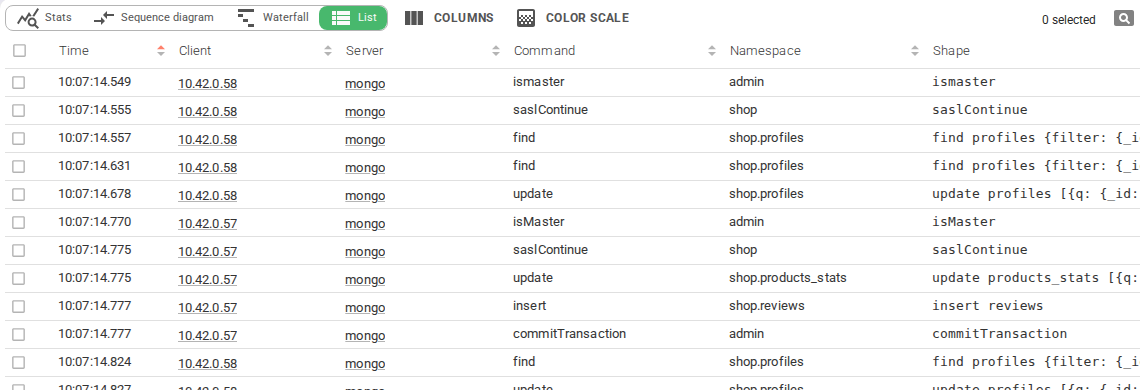
MongoDB communications appear in the dedicated MongoDB view - grid, timeline, dashboard, map, statistics, waterfall, sequence diagram and diff - and in the unified All view.
Global Tab
The Global tab summarises the exchange: timing, identification, request, response, connection, tags and Spider info.
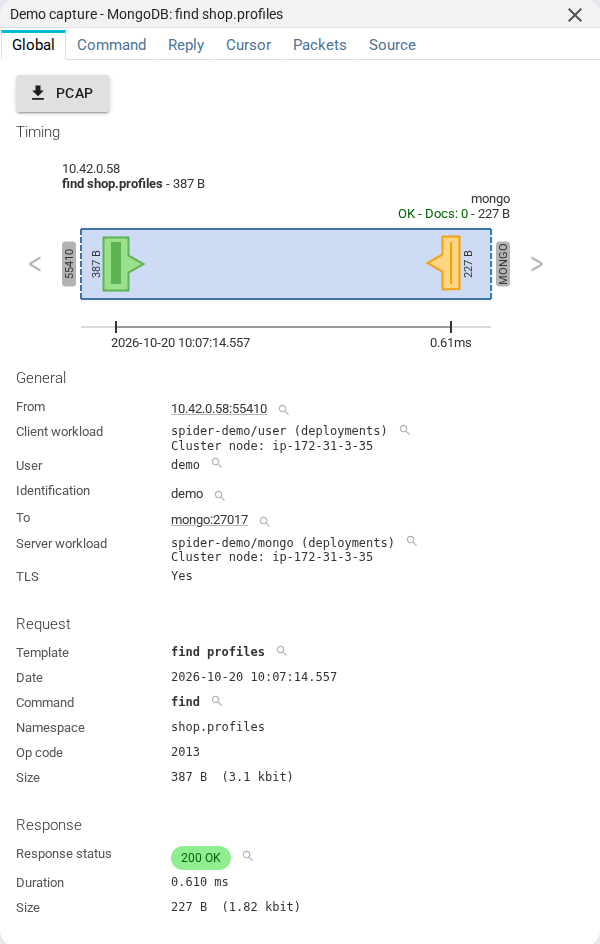
Timing
The timing diagram shows the client and server hosts, the request (green) and response (orange) shapes scaled by
the packet timestamps, and the response summary. The MongoDB server port (27017 by convention) is labelled.
- The client and server hosts are shown, by order of preference:
- The short name of the Host, as extracted during integration in the backend, or as renamed by a user
- The FQDN of the Host
- The IP address, if no Host found
General
| Field | Description |
|---|---|
| From | The client, with the application name and the user of the connection |
| To | The server, with the server version, and the replica set name when it reports one |
| Client workload | Kubernetes workload of the client, when resolved - see Workload identity |
| Server workload | Kubernetes workload of the server, when resolved |
Request
| Field | Description |
|---|---|
| Template | Stable name of the command, see Templates. Click to filter. |
| Date | Date the request started, user's local time |
| Request | The command, its database and its collection. Click to filter by command, database or collection. |
| Options | Read preference, read concern, write concern, maxTimeMS, and the transaction when there is one |
| Compressor | The compressor of the message, when compressed |
| Size | Total bytes of the request |
Response
| Field | Description |
|---|---|
| Response status | The computed status, see Statuses |
| Duration | The difference between request start and response end |
| Documents | Number of documents returned in the batch |
| Matched / modified / upserted | For writes, the documents matched (n), modified and upserted |
| Error | The error code, its name (codeName) and message. A write error count is shown for bulk writes. |
| Cursor | The cursor id, and whether the cursor is exhausted |
| Size | Total bytes of the response |
Tags
Tags are a very powerful feature of Spider's parsing process.
They are configured at Whisperer level, and allow custom extraction of data from the commands and their replies. They allow searching and aggregating by the extracted values, and correlating MongoDB commands with the rest of Spider's data.
Tags may be enriched / decoded by a plugin.
Connection
The connection section shows what the handshake told Spider about the client and the server:
| Field | Description |
|---|---|
| Driver | Driver name and version |
| Application name | The appName set by the application |
| Operating system | Client OS type and name |
| User, mechanism | The authenticated user and the authentication mechanism |
| Compressors | Compressors offered by the client, and the one negotiated |
| Server | Server version and maximum wire version, replica set name, mongos or not |
A badge says when the handshake was not captured: the connection was opened before the Whisperer was attached, so driver and user are unknown until the pool opens a new connection. A badge also says when the metadata was restored from a connection record seen earlier, for example after an idle split of the TCP session.
Spider info
| Field | Description |
|---|---|
| Whisperer | Name and link to the Whisperer |
| Instance | Instance of the Whisperer that captured the communication |
| Tcp session | Tcp session id and link |
Command tab
The Command tab shows the command:
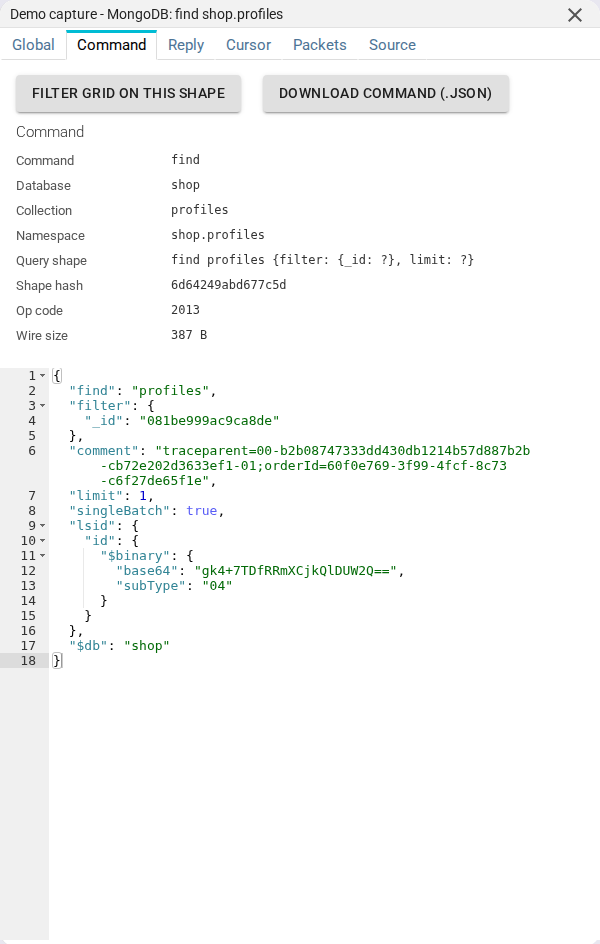
- Command, database and collection.
- Query shape and shape hash - the command with its values replaced by
?, with aFilter grid on this shapebutton. - Op code and wire size.
- Command document - the whole command in Extended JSON, highlighted and foldable. Write payloads are replaced by
<redacted>. - Comment - the
$commentset by the application, often a trace parent.
The command document is stored in the communication content, separately from the metadata. When the content is not available (not saved, past the size limit, or restricted for your access), the tab says so instead of showing it.
The command document and the reply documents can contain anything the application wrote or read.
They are only shown to users with payload access, and the read API strips them for others.
The Save write documents and Save reply documents settings switch their storage off.
Reply tab
The Reply tab shows:
- the outcome:
ok, the error code, its name and message, and the write errors of a bulk write; - the counters: documents returned, matched, modified, upserted;
- the documents of the batch, in Extended JSON, so types survive: dates,
ObjectId, decimals, binary.
The documents are saved (or not) according to the Whisperer content settings. When documents are dropped, because they are not saved or past the size limit, a notice says so, with the original size.
Cursor tab
The Cursor tab only appears on cursor-related commands: one that opens a cursor (find, aggregate...) or continues one (getMore).
It summarises the whole read, whichever batch you opened:
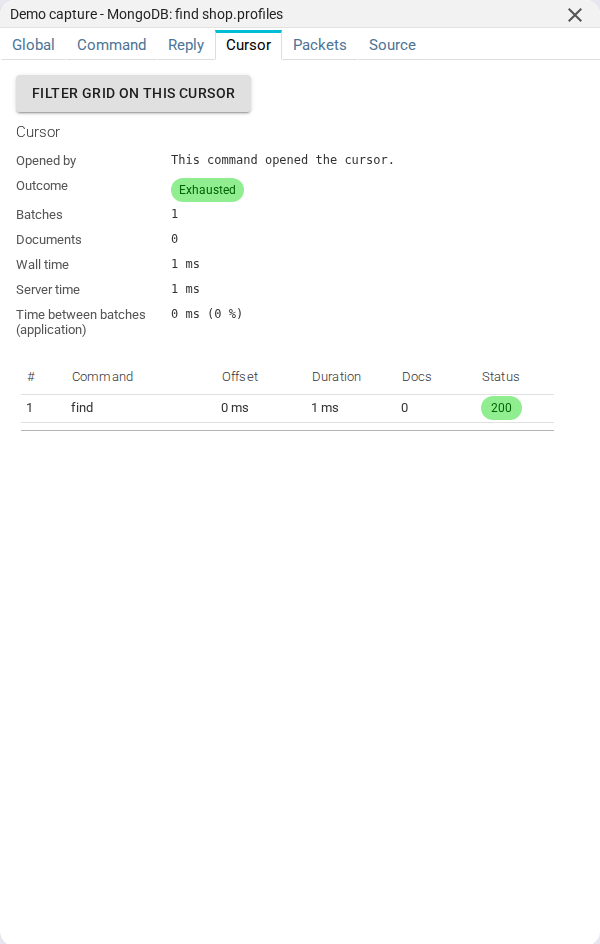
| Field | Description |
|---|---|
| Batches | Number of batches: the opening command plus its getMores |
| Documents | Documents returned over all batches |
| Wall time | From the start of the first request to the end of the last reply |
| Server time | The sum of the durations of every batch |
| Time between batches (application) | Time the application spent between two batches, with its share of the wall time |
| Outcome | exhausted (the server closed the cursor), killed (killCursors), error, or open (not finished in the capture) |
The tab links to the command that opened the cursor, and a Filter grid on this cursor button lists all its batches in the grid.
Linking relies on the cursor id, kept by the parser for 10 minutes after the last getMore.
A getMore whose origin was not captured stays unlinked and is shown on its own.
For a cursor of more than 1000 batches, the summary is computed on the first 1000 and flagged as partial.
Packets tab
The Packets tab shows the network packets composing the communication.
You may open them by clicking on the rows.
| Field | Description |
|---|---|
| Dir | Direction of the packet |
| Time | Time the packet was captured |
| Payload | Size of the TCP payload |
| Info | Flags and beginning of TCP payload, in ASCII |
::: note When MongoDB uses TLS, the packets are encrypted. The only ways to see them decrypted is to access the TCP session, and:
- to read the packets from the beginning, in the
contenttab, - or to export the session in
.pcapngformat (for Wireshark or alike) :::
Source
The Source tab shows the MongoDB communication in JSON format, as available through the API.
Below is a sample find (abridged):
{
    "@id": "aQx7MnPqRsT9BuYvWoNa8c.shop-api-6d9f7c-kx2lp.4021.10.42.0.31-52114-10.43.12.8-27017.713002114.MongoCom.7",
    "@type": "MongoCom",
    "whisperer": "aQx7MnPqRsT9BuYvWoNa8c",
    "instanceId": "shop-api-6d9f7c-kx2lp",
    "tcpSession": "aQx7MnPqRsT9BuYvWoNa8c.shop-api-6d9f7c-kx2lp.4021.10.42.0.31-52114-10.43.12.8-27017.713002114",
    "kind": "find",
    "status": "COMPLETE",
    "conn": {
        "driverName": "mongo-go-driver",
        "driverVersion": "1.17.1",
        "appName": "catalog",
        "username": "catalog",
        "compressors": ["zstd"],
        "negotiatedCompressors": ["zstd"],
        "serverVersion": "8.0.17"
    },
    "req": {
        "opCode": 2013,
        "command": "find",
        "db": "shop",
        "collection": "reviews",
        "shape": "find reviews {filter: {productId: ?}, limit: ?}",
        "shapeHash": "9f3a21c4",
        "template": "find reviews {filter: {productId: ?}, limit: ?}",
        "readPreference": "primary",
        "size": 148,
        "startDate": "2026-10-20T09:12:41.089Z"
    },
    "res": {
        "ok": 1,
        "docCount": 20,
        "cursor": {"id": 7788123456789, "exhausted": false},
        "size": 9214,
        "endDate": "2026-10-20T09:12:41.094Z"
    },
    "stats": {
        "withTls": true,
        "statusCode": 200,
        "statusText": "Ok",
        "duration": 0.005,
        "tags": {"values": {}, "count": {}, "cardinality": {}}
    },
    "mongoParsing": "aQx7MnPqRsT9BuYvWoNa8c.shop-api-6d9f7c-kx2lp.4021.10.42.0.31-52114-10.43.12.8-27017.713002114.MongoParsingLog"
}
Most fields are indexed and searchable.
Some extra explanation:
| Field | Description |
|---|---|
| kind | The command name, also in req.command |
| conn | Driver, application name, user, compressors and server of the connection when the communication was emitted. handshakeMissing and restored flag its origin. |
| req.opCode | The wire message: 2013 is OP_MSG, 2012 OP_COMPRESSED, 2004 legacy OP_QUERY |
| req.shape, req.shapeHash | The query shape and its hash |
| req.template | Computed name of the command, see Templates |
| req.commandDoc | The command document, redacted and cut to commandDocMaxRunes. Payload field: stripped for users without payload access. |
| req.comment | The $comment of the command. Payload field. |
| req.cursor | On a getMore: the cursor id, the originComId of the opening command and the batch number |
| req.orphan | true for a reply whose request was not captured |
| res.ok | 1 when the command succeeded |
| res.code, res.codeName | The server error code and name. Absent when the command succeeded. |
| res.errmsg | The error message. Payload field. |
| res.n, res.nModified | Documents matched and modified by a write |
| res.docCount | Documents returned in the batch |
| res.cursor | The cursor id of the reply and whether it is exhausted |
| stats.withTls | true when the exchange was carried over TLS |
| stats.statusCode | 200, 500, 1000 or 1001, see Statuses |
| stats.tags.* | Extracted tag values, count and cardinality |
| mongoParsing | Id of the parsing log document for this communication |
The command document and the reply documents are stored separately, in a dedicated per-communication MongoComContent
store, and fetched on demand from the Command / Reply tabs. The communication document itself stays small and
fast to search.
Templates
The req.template gives a stable name to a family of commands, so you can aggregate them. It is computed as follows:
- The first template rule whose pattern matches the query shape.
- Otherwise the query shape: every value is replaced by
?, and operators and field names are kept.find orders {filter: {status: "NEW"}}andfind orders {filter: {status: "SHIPPED"}}are then the same template. The shape is cut at 2048 bytes and nesting at 32 levels.
getMore and killCursors take the shape of the command that opened the cursor, so a whole read aggregates under one name.
The same shape also gets the short shapeHash, handy to group in the dashboard and statistics.
Statuses
Like the other protocols, a MongoDB communication gets an HTTP-like status:
| Status | Meaning |
|---|---|
200 Ok | The command succeeded (ok: 1) |
500 Error | The server answered ok: 0, or the write reported errors. The code, its name and message are kept verbatim. |
500 Incomplete | The reply started and was cut off |
1000 No response | No reply was captured. Not an error. |
1001 No response expected | The request does not expect a reply (moreToCome, an unacknowledged write). Not an error, and not counted as no-response. |
Views
Besides the grid and its filters, the MongoDB collection offers the same analysis views as the other protocols:
- Dashboard - throughput, errors, durations, top shapes, top collections, top commands, top clients and drivers.
- Map - which workloads talk to which servers, with the volume and error rate of each link.
- Statistics - aggregations by shape, collection, command, error code or tag.
- Waterfall and Sequence diagram - the commands of a client in time, and the exchanges between the hosts involved.
- Diff - compare two communications, for example the same shape before and after a change.
- Host details - MongoDB activity and the commands seen on a host.
The filters cover command, database, collection, shape / template, status, error code and name, cursor outcome, driver, application name, user, compressor, and the tags.
The TCP session of a MongoDB connection carries a MongoDB badge, and links to its communications.
Retention and purge
MongoDB communications follow the same Data Storage Policies as the other protocols. They can be removed from Spider with the purge tool, which deletes a communication together with its content. Only uploaded data is purged this way: streamed data expires with its index lifecycle.
Export and re-import
- Export - MongoDB communications are exported to S3 like the other protocols: one row per communication, with the command document and the reply documents as payloads. Needs the
EXPORTlicence, and payload access to get the payloads. - Re-import - an exported or downloaded communication can be re-imported, with its content, through
POST /mongo-parser/v1/mongo-com. The content is stored under the settings of the target Whisperer.
Monitoring
Self-monitoring shows the MongoDB pipeline status next to the other protocols: complete / incomplete / error communications, parsing delay, queues of the poller-mongo poller and circuit breakers.
MongoDB metrics are also part of the OTLP metrics export.
Access from the CLI and AI agents
MongoDB communications are available in the spider CLI (spider search|stats|aggs|outliers mongo)
and in the MCP server (type: mongo).