Payload fields
Show a value from inside the JSON payload of a communication as a column of the grid, without leaving the grid.
Concept
A payload field is a named path into the body of a communication - value.items.#.sku, value.customer.id, a header such as
headers.x-tenant. Once defined it behaves like any other column: you can drag it, resize it, see it in the
Global tab of the details panel, and it is written to the Excel and CSV exports.
The value is read when the grid is displayed, from the stored payload, for the communications of the page you are looking at. Nothing is indexed, so a payload field can be neither filtered, sorted nor searched. To search or aggregate on a value, turn the field into a tag with Promote to tag.
Available on HTTP, stream (SSE and WebSocket), gRPC, Kafka, Redis, MQTT and MongoDB grids, and in the All view. PostgreSQL, MySQL and
DNS communications carry no JSON payload and offer no payload fields. Needs the PAYLOAD_FIELDS licence capability (TEAM tier) and payload access
on the whisperer.
Defining a field
Click the Payload fields button of the grid toolbar. The panel opens in the details area (click the button again to close it).
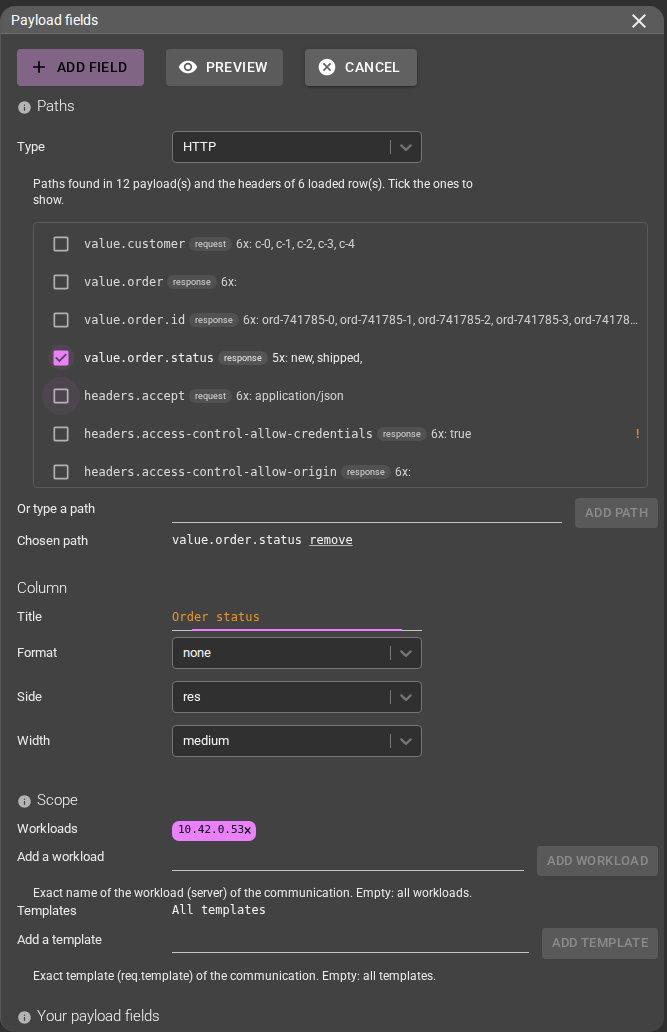
- Pick paths. The panel lists the paths found in the payloads of the communications loaded in the grid, each tagged request or
response, with a few sample values. Tick one or more, or type a path by hand. Paths whose name looks like a credential or personal data
(
password,token,secret...) carry a warning. - Name it. The title becomes the column header. Fields with the same title merge into one column.
- Set the side.
autoreads the response and falls back to the request - what the export does. Pickreqorresto be explicit. - Set a format (optional): text, date (with your timezone), number, bytes (B, KB, MB, GB, TB) or duration (input and output unit).
- Set a scope (optional): lists of server workloads and of templates. The field is only read on rows that match both lists; other rows show a blank cell. The lists are prefilled from the rows that carry the ticked paths. The panel warns when they match none of the rows read.
With several paths, the first path that has a value is shown on each row.
Paths
| Path | Reads |
|---|---|
value.a.b | The body (the transcoded body for protocols with a payload decoder, such as MQTT). Dot-separated, # for each element of an array. |
headers.name | An HTTP header or a gRPC metadata entry of the side the field reads. Case-insensitive; HTTP and gRPC only; needs req or res as the side. |
MongoDB reads the command document on the request side and the reply documents (as one array) on the response side.
Reading the cells

The last two rows above show an absent path (—) and an empty value (∅).
| Cell | Meaning |
|---|---|
| The value | Extracted and formatted. Click it to highlight the same value in the other loaded rows (page-local, nothing is queried). |
Muted dash — / empty set ∅ | The path is absent from the payload / the value is empty. |
| Not stored marker | The communication has no stored payload (payload saving off, purged, over the size cap). |
| Forbidden marker | You cannot read the payload of this communication. No value is ever shown. |
| Blank | The row is outside the scope of the field. |
| Skeleton | Still loading: metadata appears first, payload cells fill in after. |
A cell is capped at 64 KiB. Values are the same in the grid, the details panel, Excel and CSV.
Columns, All view and details
- Payload columns appear in the Columns drop-down; drag them like the others. The order is saved.
- Definitions belong to the grid they were created in, but every grid that shows that collection displays them, so the All view shows the fields of the HTTP view. The panel lists them as defined in the HTTP view; remove them from the view that owns them.
- A field with a value for the selected communication also appears as a row in the Global tab of its details.

Export
- Excel receives the visible payload columns for the selected rows. Bytes and durations are numbers in the chosen unit, dates are Excel dates (timezone applied).
- CSV opens with the visible payload fields already in the column matrix of Export communications. The CSV export uses the first path of a field only.
Teams
Your fields are saved with your settings (up to 100). In the team settings, Copy from user shares a field with the team as an independent copy; later edits of your own field do not change it. Team administrators can remove team fields there, not edit them from the grid. The first matching definition wins per row: yours first, then the team's.
Access control
Payload access is inherited, not re-implemented: a user sees a value only if they could read that payload in the details. A communication you may not read answers forbidden for every field, and neither the value nor its text leaves the server. An unknown or inaccessible communication looks the same.
Headers are not payload. A user without payload access still sees fields made only of headers.* paths, minus the headers listed in
server.webStreams.headersToFilter (parse time) and the whisperer's header deny list (read time). By default that list is empty: Authorization
is not redacted unless an operator lists it. A field mixing a header and a body path stays forbidden.
Promote to tag
A payload field is read at display time. A tag is extracted at parse time and is searchable, sortable and aggregable. Promote to tag, on a field of the panel, previews the tag rule that would extract the same value, how far its values agree with the column on the loaded communications, and the warnings:
- the value becomes visible to users without payload access;
- body patterns are approximate for HTTP, Redis, WebSocket and SSE (a regular expression on the last key of the path); JSON paths are used for MQTT, gRPC, Kafka and MongoDB; HTTP headers translate exactly;
- only the first translatable path is kept.
Applying writes the rule to the chosen whisperers. It only tags communications parsed afterwards, once the configuration reaches the
parsers (about 5 minutes); existing communications are not tagged. Needs the ADVISOR licence capability.
Limits
Up to 50 fields and 200 communications per request; 10 paths per field; no filter, sort or search on a payload column; JSON payloads only (no XML, form or binary).